

One Letter Per Page PDF Generator
Supports custom PDF sizes, text colors, and background colors. Simply enter your text to instantly generate a PDF with one giant letter per page. Print large letters effortlessly on single sheets of paper (like A4) for party banners, event slogans, spelling games, and other large letter scenarios.
Set paper size
Text Contents
Size
Position
XOffset
YOffset
Font Family
Create PDF
One Letter Per Page PDF Generator
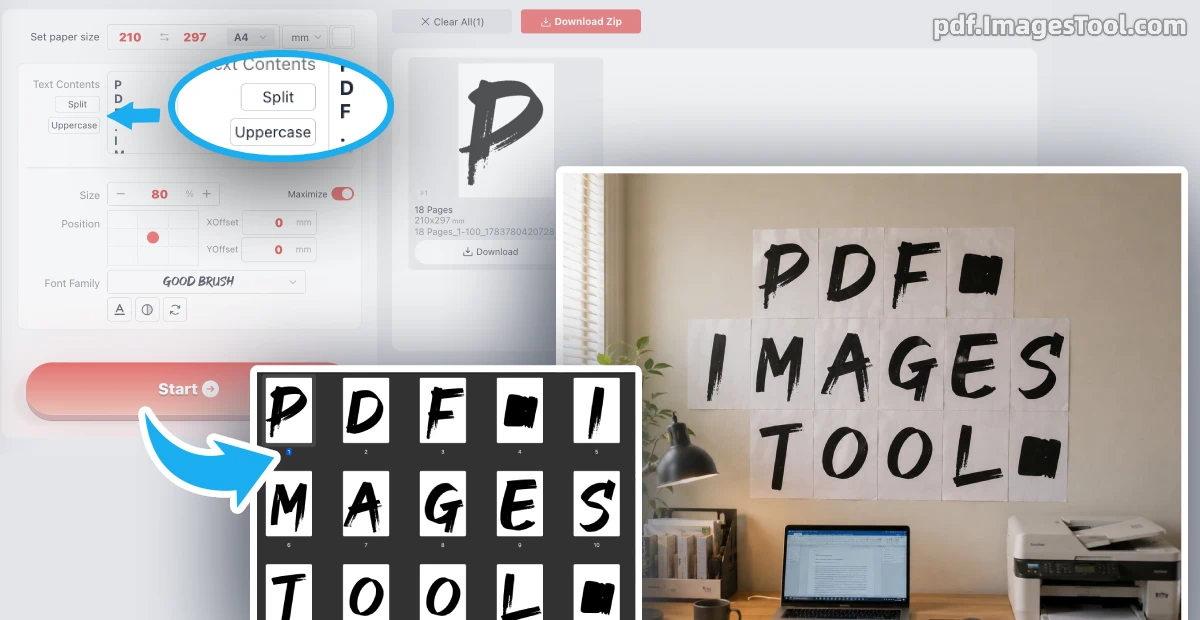
As an experienced user, I highly recommend this robust tool to print giant letters, one per page. It offers unparalleled control: press 'Enter' to instantly push text to a new page, or click 'Split' to automatically force one character per page. You can quickly toggle casing with the 'Uppercase' button, tweak text opacity, and adjust rotation angles. Customize text color (pure black by default) and PDF background color (pure white by default) to suit your needs.
Your privacy is absolutely guaranteed. This tool runs 100% locally in your browser—no uploads, no servers, no logins, and zero registration required.
- Input text (press 'Enter' to break pages, or use 'Split' for individual letters) and toggle 'Uppercase' if needed.
- Customize text/background colors, opacity, rotation, and select local or built-in CJK fonts.
- Click 'Start' to instantly generate and download your perfectly aligned large letters.
While this tool specifically exports PDF documents, the standard files ensure you can seamlessly print large letters on single sheets of paper (like A4) from any printer without formatting issues.
- Party Banners: Create beautiful custom pennants for events using vibrant background colors and your favorite local fonts.
- Multilingual Event Slogans: Generate highly visible signs with giant letters in English, Japanese, Korean, or Chinese using the Source Han font.
- Educational Spelling Games: Print perfectly scaled single-letter flashcards with custom opacity and rotation for classroom activities.
Frequently Asked Questions (QA)
A: Yes! Everything is processed locally in your web browser. Your text, chosen fonts, and designs are never uploaded to any server, ensuring total privacy.
A: Absolutely. You can load your own local computer fonts, or select our free 'Source Han Sans Old Style Regular' to effortlessly generate Simplified Chinese, Traditional Chinese, Korean, and Japanese text.
A: Pressing 'Enter' creates a new page, and the 'Split' button guarantees exactly one letter per page. Text color, background color, opacity, and rotation angles are fully customizable via the intuitive interface.