

Overlay PDF - Superimpose and Stamp PDF Pages Online
Free online PDF overlay tool to superimpose, stamp, or merge PDF layers seamlessly. Easily place letterheads, watermarks, stamps, or multi-page templates onto target documents. Fully customize overlay layout, dimensions, margins, alignment, opacity, and page ranges without losing document quality. You can also import JPG, PNG, and WebP images.
Try these now PDFs:
Does this online conversion service protect my privacy? Are the files I import safe?
Very safe, because your files never leave your device and are not uploaded. ImagesTool uses browser technology to achieve the conversion service that previously required uploading.
Everything happens only in your browser, 100% protecting your privacy.
You can do a test Convert once, then disconnect the device from the network, and convert again and you will find that everything is normal.
Add & Edit Content
Overlay PDF Pages Online with Complete Precision and Privacy
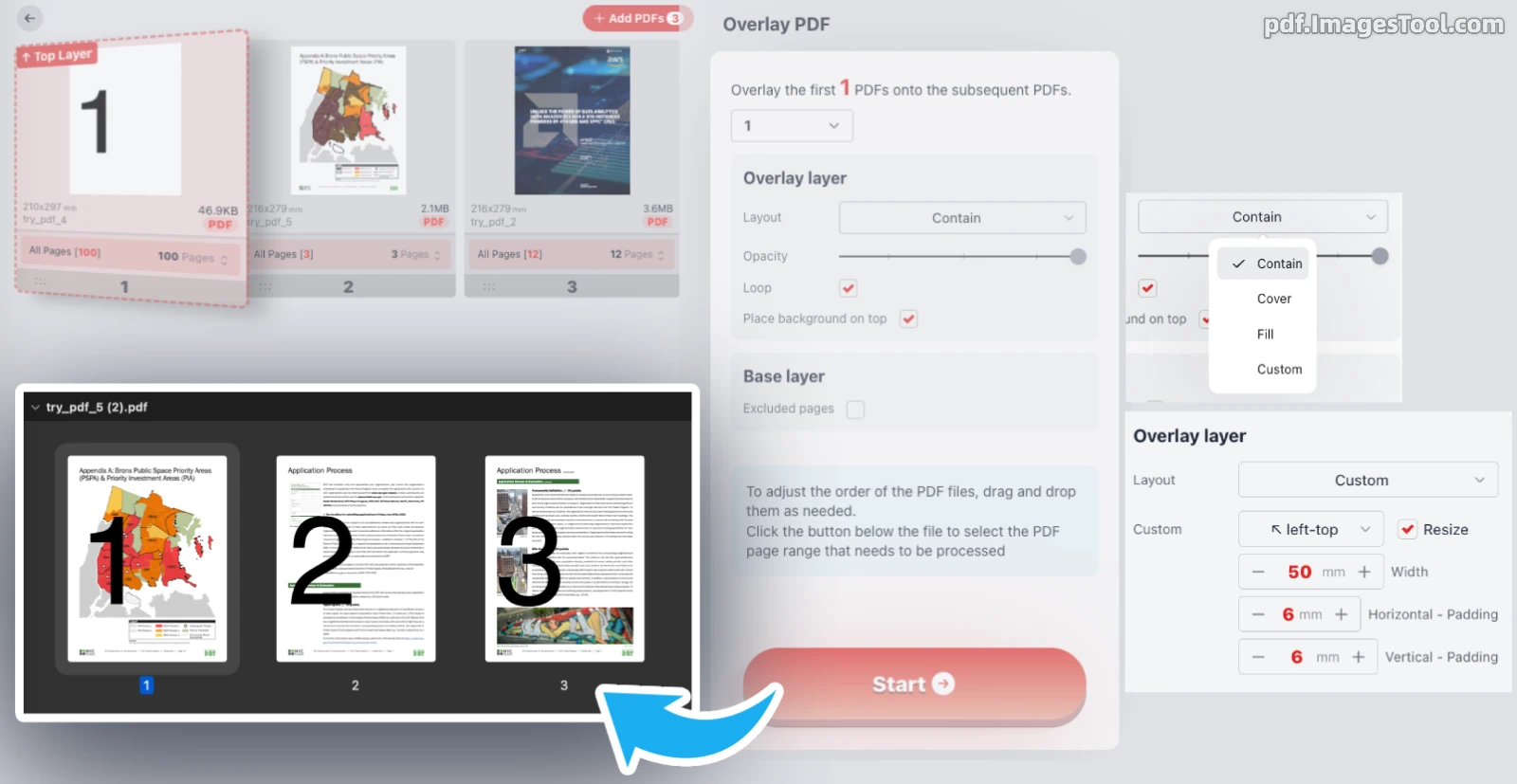
Superimposing templates, official letterheads, or background stamps onto complex multi-page documents often ruins alignment or inflates file sizes. This professional PDF overlay tool gives you granular control over page layering without flattening vector quality.
You can designate any number of top layers, drag and reorder documents effortlessly, and fine-tune placement—from custom millimeter-level width and padding to 9-point alignment, variable opacity, page looping, and background-layer switching. Whether you are applying watermarks across an entire file or stamping numbered covers onto reports, layering is fast, visual, and pixel-perfect.
100% Client-Side Privacy: All processing runs directly in your browser. Files never leave your device—no servers, zero uploads, no sign-ups, and absolute document confidentiality.
How It Works:
- Upload & Arrange: Add your PDF files and drag cards to position your overlay templates ahead of base documents.
- Select Overlay Count: Specify how many initial documents serve as top layers to apply over the subsequent pages.
- Customize Layer Settings: Set anchor points (e.g., top-left), scale dimensions, adjust margins, set transparency, or toggle looping and base-page exclusions.
- Export Merged PDF: Click Start to instantly compile your layered document locally at native resolution.
Flexible Format Support: Beyond standard PDFs, you can also import raster templates including JPG, PNG, and WebP images to overlay as high-resolution digital stamps or signatures.
Practical Use Cases:
- Digital Letterheads & Stationery: Superimpose pre-designed corporate headers, footers, and border art onto raw text outputs or invoices without editing source files.
- Dynamic Watermarking & Status Stamps: Add semi-transparent 'DRAFT', 'CONFIDENTIAL', or approved signature stamps with precise opacity and placement control.
- Bilingual & Dual-Layer Reports: Layer translated annotations, review markups, or technical grid overlays directly over existing architectural and engineering schematics.
- Multi-Page Looping & Batch Templates: Automatically repeat a multi-page framework across long documents, or selectively exclude specific cover pages from receiving the overlay.
Frequently Asked Questions (QA)
A: Not at all. The entire overlay operation runs locally inside your browser via WebAssembly and JavaScript. Your files never touch an external server or cloud storage.
A: When enabled, if your top layer template has fewer pages than the target document, the overlay pages automatically repeat from page one until the end of the base file.
A: Yes. Use the Excluded pages setting in the Base layer panel to define individual pages or page ranges that should remain untouched.
A: No. The tool preserves embedded fonts, vector shapes, and native color profiles, ensuring your stamped result prints and scales crisply.