Edit PDF Bookmarks/Outline & Manage Table of Contents
Easily modify PDF bookmark labels and update destination pages. This tool allows you to create deeply nested outlines, import or export bookmark structures via JSON, and automatically detect and fix page number errors for a perfect navigation experience.
Drop PDFs, Folders here or
ctrl + v
Try these now PDFs:
Local Run
Does this online conversion service protect my privacy? Are the files I import safe?
Very safe, because your files never leave your device and are not uploaded. ImagesTool uses browser technology to achieve the conversion service that previously required uploading.
Everything happens only in your browser, 100% protecting your privacy.
You can do a test Convert once, then disconnect the device from the network, and convert again and you will find that everything is normal.
Master Your Documents: The Ultimate PDF Bookmark & Outline Editor
Organize, Navigate, and Optimize your PDFs without ever uploading a file.
Welcome to the most secure and efficient way to manage your PDF documents. Whether you are dealing with academic papers, technical whitepapers, or large corporate reports, navigation is key. Our PDF Bookmark Editor allows you to effortlessly create, modify, and restructure the Table of Contents (TOC) of any PDF file. Unlike other tools that require software installation or risky cloud uploads, our solution runs entirely in your web browser.
Privacy Guarantee: Your files never leave your device. All processing is handled locally within your browser environment. This means 100% privacy, zero data leakage risks, and lightning-fast performance regardless of your internet connection speed. No sign-up, no login, and no registration required.
Core Features
1. Comprehensive Bookmark & Outline Management
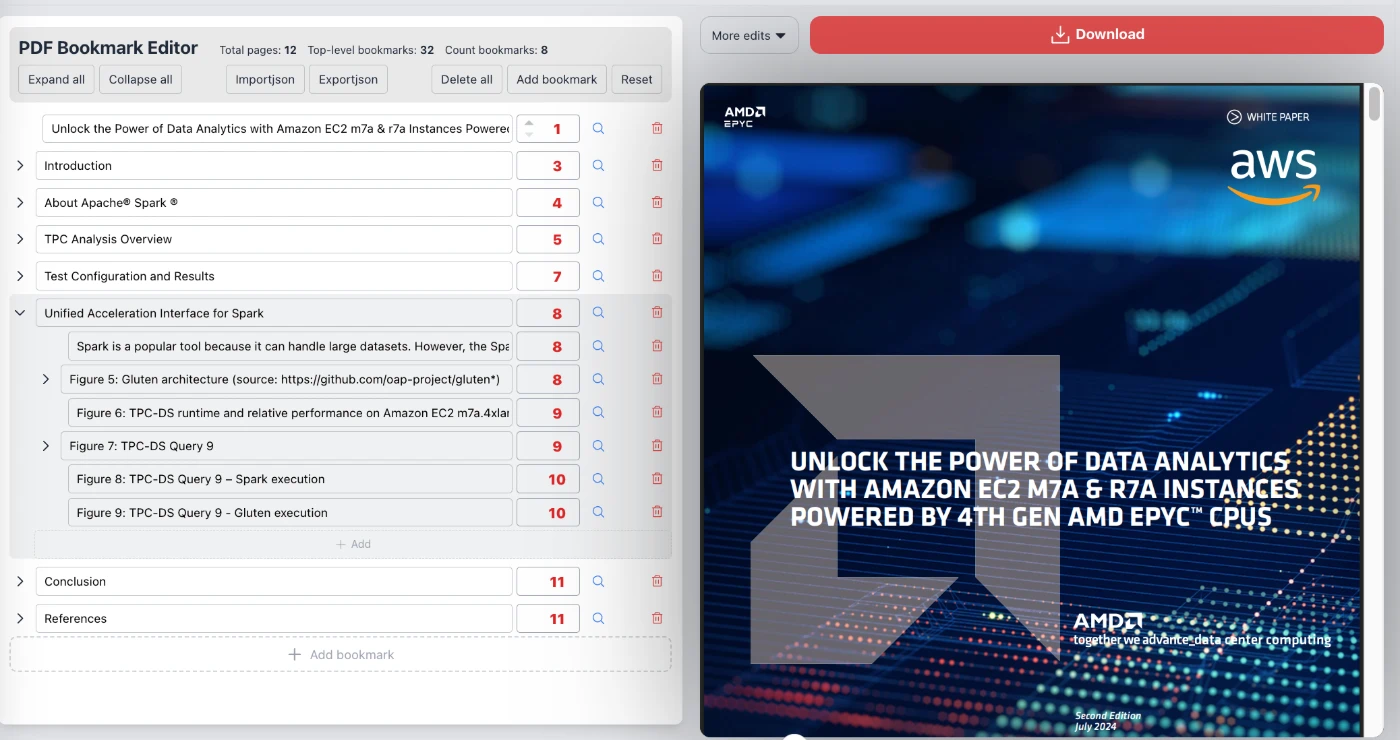
Transform a flat PDF into an interactive document. Our intuitive interface allows you to add new bookmarks, rename existing labels, and delete unnecessary entries. You can create deeply nested outlines to reflect complex document hierarchies (chapters, sections, subsections) simply by organizing items in the editor view. This ensures your readers can jump to the exact information they need instantly.
2. Advanced Metadata Editing
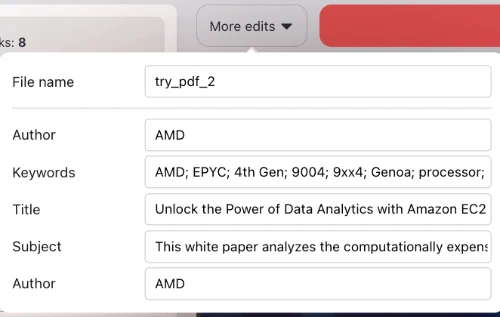
Professional documents require accurate metadata. Beyond just bookmarks, our tool provides a dedicated panel to edit the document's core properties (as seen in the screenshots). You can modify:
File Name: Rename your file before saving.
Title & Author: attribution and display in PDF readers.
Keywords: Enhance discoverability and internal indexing.
Subject: Provide context for document management systems.
3. Visual Navigation & Page Targeting
Forget guessing page numbers. The tool provides a split-screen view with the bookmark editor on the left and a live PDF preview on the right. When you assign a bookmark to a destination, you can verify it immediately. The system helps you automatically detect and fix page number errors, ensuring every click leads exactly where it should.
4. JSON Import/Export Capabilities
For power users and developers, we offer a robust JSON bridge. You can export your bookmark structure to a JSON file for backup or templating. Have a standard Table of Contents structure for multiple reports? Simply import the JSON structure into a new PDF to instantly apply the bookmarks, saving hours of manual data entry.
5. Bulk Operations
Efficiency is built-in. Use the toolbar to Expand All or Collapse All nodes to view your structure at a glance. Need a fresh start? The Delete All function clears the current outline, while the Reset button reverts changes, giving you complete control over your editing session.
How It Works
Open Your File: Drag and drop your PDF into the browser window. The file loads instantly because it isn't being uploaded to a server.
Edit Structure: Use the "Add Bookmark" button or edit existing entries. create hierarchies to organize content logically.
Update Metadata: Click the edit icon to input the Author, Title, and Keywords to professionalize your document.
Save: Click "Download" to save the modified PDF directly to your disk with the new bookmarks and metadata embedded.
Frequently Asked Questions (Q&A)
Is my document secure? Do you store my files?
Yes, your document is 100% secure. We utilize advanced web technologies (WebAssembly) to process the PDF strictly on your device (client-side). Your file is never uploaded to our servers, meaning we cannot see, store, or share your data. It works exactly like a desktop application, but inside your browser.
Is this tool free? Do I need to register?
This tool is completely free to use. There are no hidden paywalls, no "pro" versions, and absolutely no login or registration required. We believe in providing accessible tools without user friction.
Why should I edit PDF Metadata?
Editing metadata (Title, Author, Keywords) is crucial for SEO (Search Engine Optimization) if your PDF is published online. It helps search engines like Google understand the content of your file. Additionally, it improves the experience in PDF readers and accessibility software by providing accurate context about the document.
Can I move bookmarks around after creating them?
Yes. The editor supports flexible management. You can change the order, nest items under parents, or promote items to top-level bookmarks to create the perfect Table of Contents structure.
What is the JSON Import/Export feature used for?
The JSON feature is a powerful tool for automation and backup. If you are working on a document and want to save your progress without saving the whole PDF, export the bookmarks as JSON. Later, you can re-import them. It is also useful if you have multiple PDFs that require the exact same bookmark structure.