

Custom Cut and Split PDF Pages
Free online PDF page cutting tool. Add and drag horizontal or vertical split lines to visually adjust positions, freely cut and accurately extract specific blocks of a PDF page. Supports automatic equal division of split lines, allowing you to easily split equally in two, split equally in three, split equally in four, split equally in five, or any custom number of parts.
Try these now PDFs:
Does this online conversion service protect my privacy? Are the files I import safe?
Very safe, because your files never leave your device and are not uploaded. ImagesTool uses browser technology to achieve the conversion service that previously required uploading.
Everything happens only in your browser, 100% protecting your privacy.
You can do a test Convert once, then disconnect the device from the network, and convert again and you will find that everything is normal.
Layout
Free Online PDF Page Splitter: Custom Cut and Extract
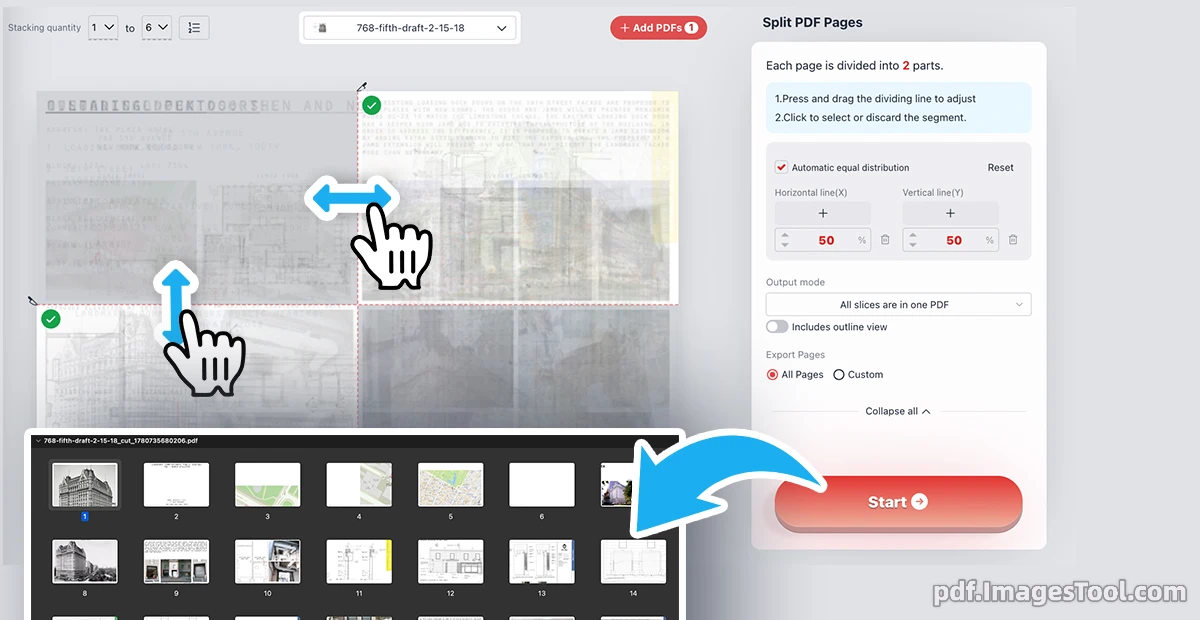
As a professional who frequently handles complex documents, I highly recommend this advanced tool to split page content. It allows you to visually add and drag horizontal or vertical split lines to cut PDF pages exactly how you need. You can freely adjust the X and Y coordinates for extreme precision or use the "Automatic equal distribution" feature. Whether you need to split equally in two, split equally in three, split equally in four, or split equally in five, it handles the math for you. Simply click to select your desired blocks (marked with a green checkmark) and discard the rest, then output them flexibly.
The PDF file size is automatically optimized after splitting, with almost no difference in file size before and after splitting.
100% secure and private. Everything runs strictly locally in your browser. No file uploads, no cloud servers, no registration, and no login required. Your data never leaves your device.
- Import your document directly into the browser workspace.
- Add custom horizontal/vertical lines and drag them, or check "Automatic equal distribution" to split equally into your desired parts.
- Click to keep specific segments (green checkmark), choose your output mode ("All slices are in one PDF" or "One PDF per page"), and hit Start.
- Double-Page Scans: Quickly split equally in two to separate scanned book spreads into individual, readable digital pages.
- Precise Element Extraction: Visually drag split lines to frame and cut out specific charts, receipts, or text blocks while discarding useless margins.
- Grid Layout Splitting: Easily divide architectural blueprints or large design drafts by choosing to split equally in four or split equally in five for detailed printing.
Frequently Asked Questions (QA)
Q: Are my sensitive documents safe when using this tool?
A: Absolutely. Our tool relies entirely on local browser processing. There are no server uploads, no logins, and zero risk of data leakage. Your privacy is guaranteed.
Q: Can I divide the page into multiple equal sections automatically?
A: Yes! By enabling the automatic distribution feature, you can effortlessly split equally in three, split equally in four, or any other layout without manually calculating percentages.
Q: What happens to the areas I don't want to keep?
A: After applying the split lines, you can simply click on any generated segment. Only the blocks selected with a green checkmark will be exported; unselected parts are automatically discarded.
Q: How are the cut segments saved?
A: You have full control over the output mode. You can either merge all selected segments back together ("All slices are in one PDF") or export each cut section individually ("One PDF per page").