

Create, Edit Rich Text & Export to PDF
A true WYSIWYG, Word-like PDF document layout editor running entirely client-side. Eliminates blurry screenshots, unselectable text, and bloated file sizes. Supports rich media formatting, advanced data tables, free commercial font embedding, custom headers & footers, and native PDF bookmark outlines with 100% private local processing.
Number of documents(0)
Does this online conversion service protect my privacy? Are the files I import safe?
Very safe, because your files never leave your device and are not uploaded. ImagesTool uses browser technology to achieve the conversion service that previously required uploading.
Everything happens only in your browser, 100% protecting your privacy.
You can do a test Convert once, then disconnect the device from the network, and convert again and you will find that everything is normal.
Create PDF
A new generation of WYSIWYG online PDF editor, allowing you to edit and create PDF document streams just like editing Word documents.
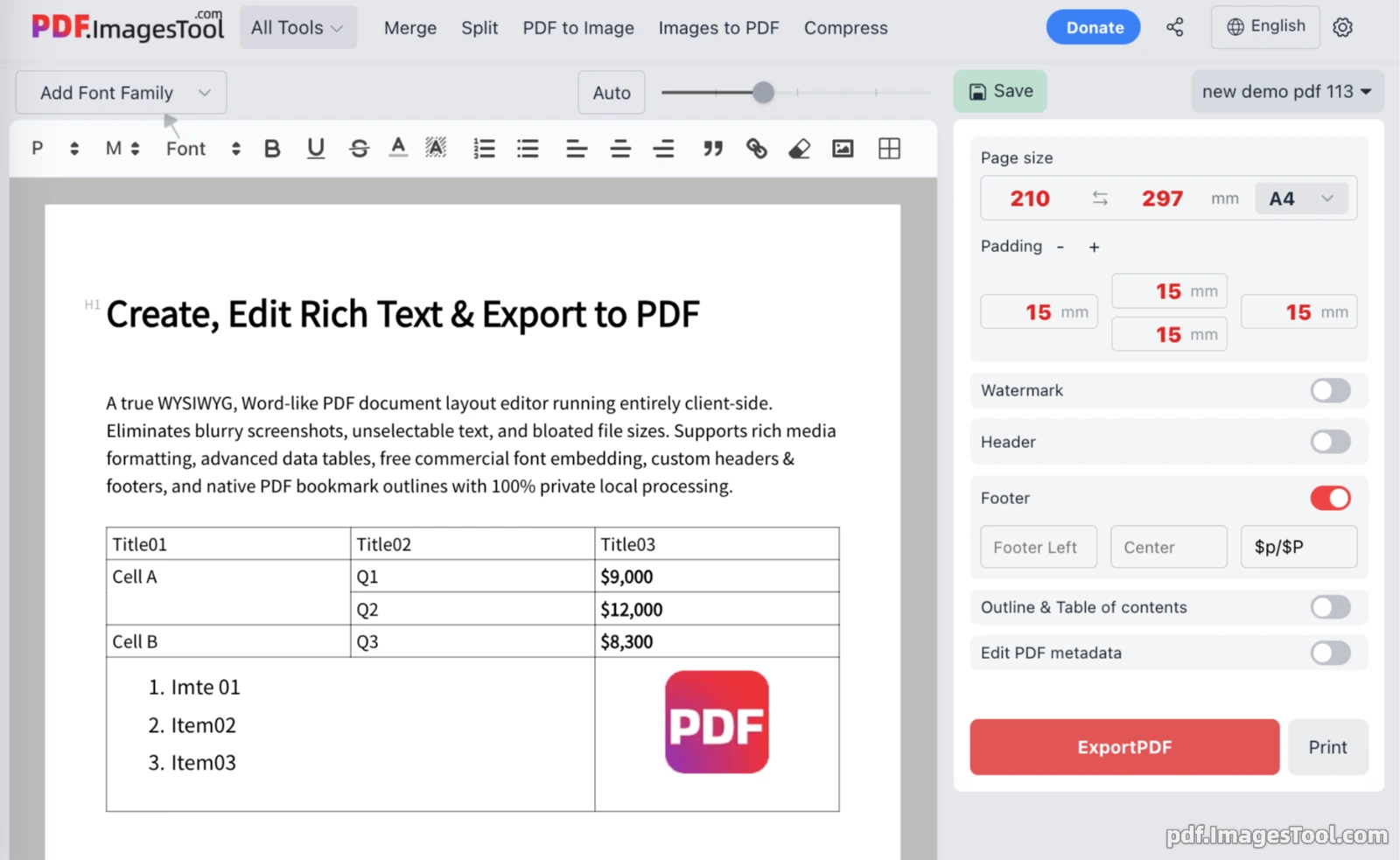
This tool is a pure front-end, high-fidelity, native vector-level online typesetting and PDF export system. Moving beyond the legacy limitations of traditional front-end html2canvas screenshot-to-PDF workflows—which often suffer from blurry rendering, unselectable text, and bloated file sizes—this modern Online Document to PDF Builder combines the power of Quill and pdfmake to deliver a true WYSIWYG PDF Editor Online experience with crisp, native vector outputs.
Below is a comprehensive guide to the key features, architecture, and capabilities of this cutting-edge Client-side PDF Generator.
1. Rich Text Content Editing and Multimedia Typesetting
Hierarchical Typography and Text Formatting
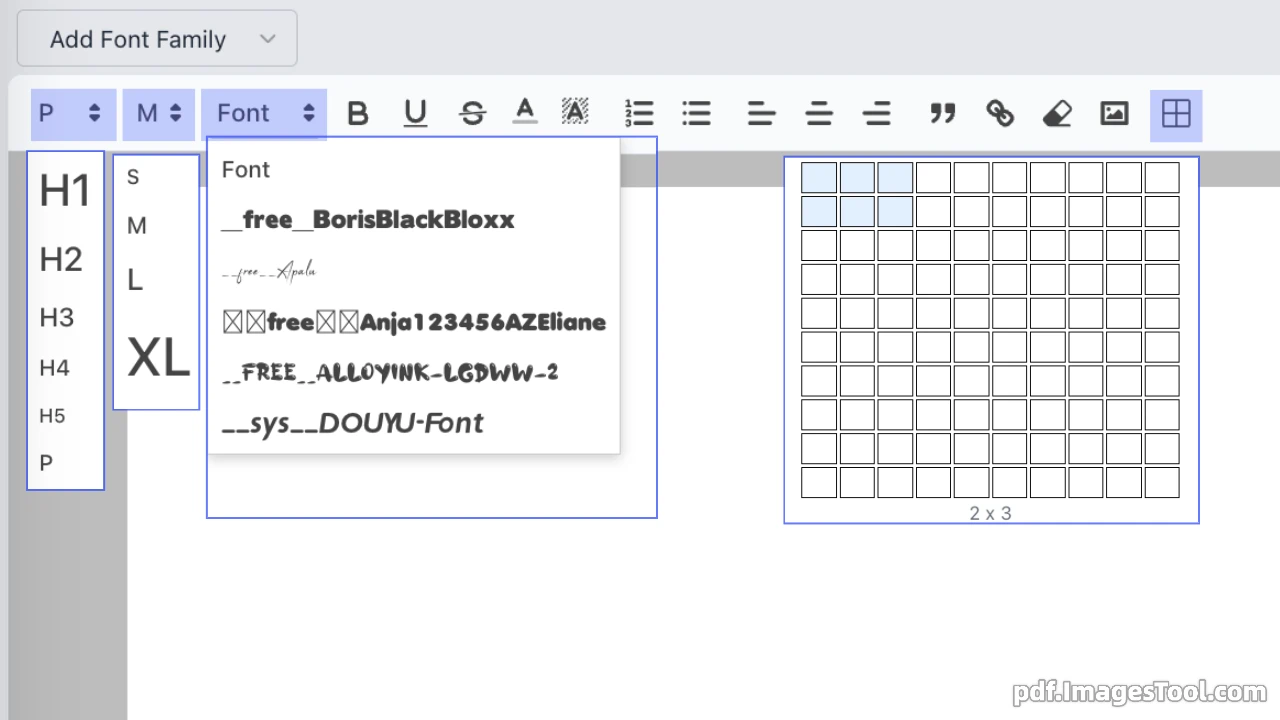
- Structured Multi-Level Headings: Instantly configure standard body text (P) and five levels of headings (H1 to H5), paired with quick font size adjustments (Small, Medium, Large, Extra Large).
- Styling and Alignment: Full support for standard formatting including Bold (B), Underline (U), Strikethrough (S), custom text colors, and background highlight markers. Features comprehensive paragraph alignment (Left, Center, Right, Justify), ordered/unordered lists, and blockquotes.
- Hyperlinks and Multilingual Typography: Seamlessly insert hyperlinks and render multi-language text (The PDF editor supports a wide range of languages, such as: English, عربي, Deutsch, Español, Français, हिंदी, Indonesia, Italiano, 日本語, 한국어, Português, Русский, แบบไทย, Türkçe, Tiếng Việt, 简体中文, 粵語中文, 繁體中文.) alongside full-color vector emojis and Unicode symbols without missing glyphs or rendering artifacts.
Multimedia and Image Processing
- Multi-Format Import: Native support for JPG, PNG, WebP, and SVG vector graphics, along with direct clipboard image pasting via Ctrl + V.
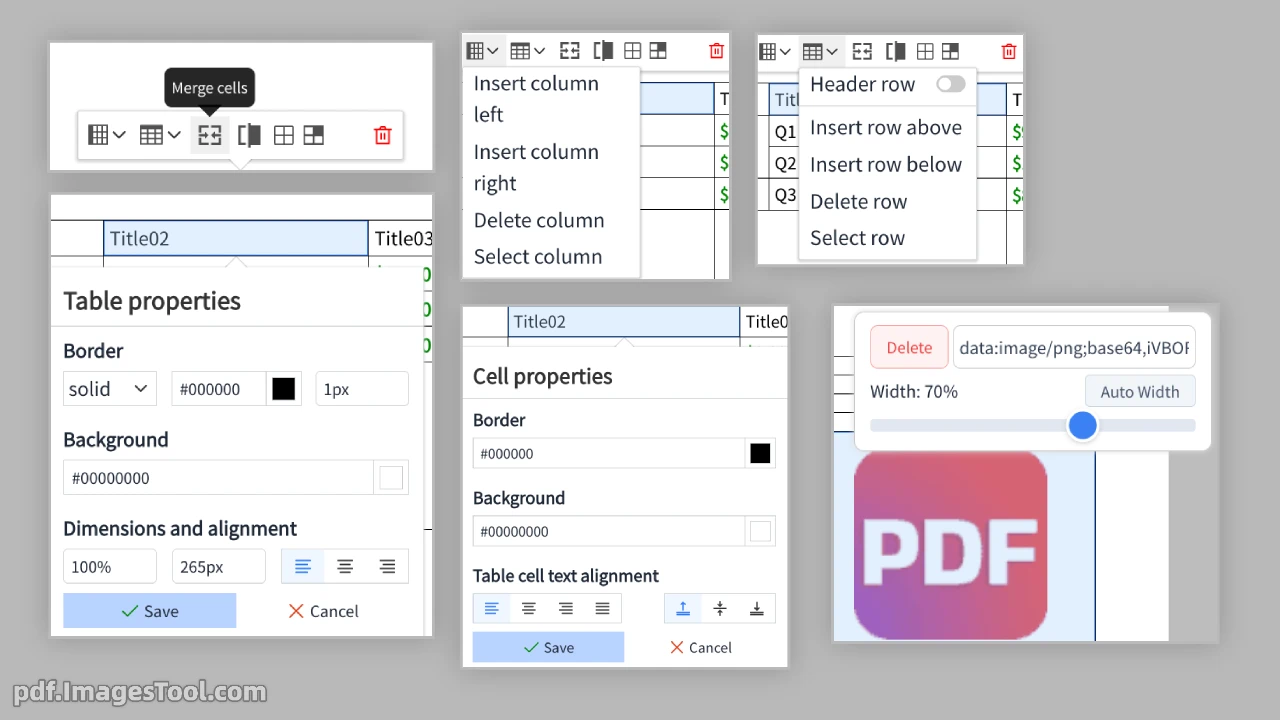
- Interactive Sizing Controls: Clicking any image reveals a floating toolbar offering drag-to-resize handles, percentage-based sliders (e.g., Width: 60%), and one-click 'Auto Width' adjustments in real time.
Structured Data Table Engine
- Flexible Layout and Operations: Rapidly insert tables with an interactive floating property bar for adding or deleting rows and columns with a single click.
- Advanced Cell Customization: Supports multi-cell merging, splitting, custom border colors, cell-level font colors, and background fill styling.
2. Advanced Font Management System
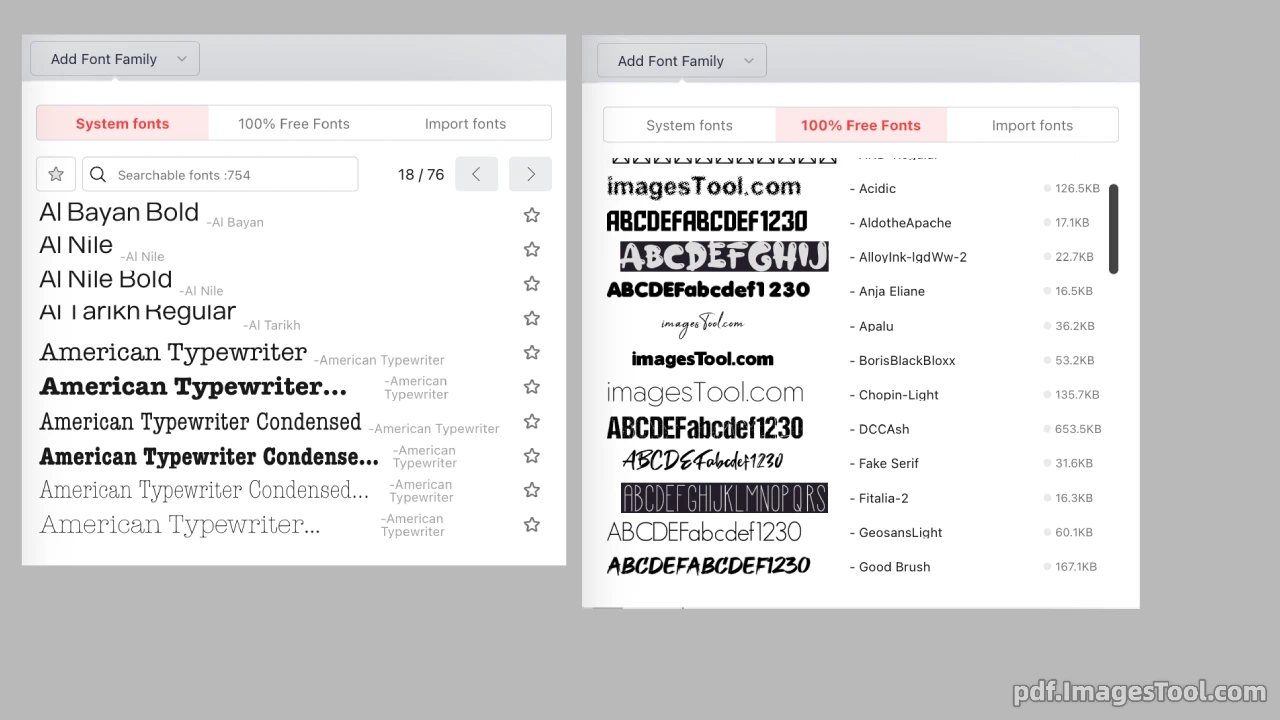
To eliminate common client-side PDF generation issues such as garbled characters, missing glyphs ('tofu' boxes □), and licensing risks, this WYSIWYG PDF Editor Online incorporates a robust font management engine:
- System Fonts: Instantly leverage local and OS-installed fonts for lightweight, rapid compilation.
- 100% Free Commercial Font Library: Pre-integrated with popular open-source, commercially safe fonts (such as Source Han Sans, Korean typography, and diverse Latin fonts) with live UI previews, file size indicators, and loading statuses.
- Custom Font Uploads: Upload custom font files (.ttf, .woff, .otf) to embed brand-specific typography directly into your exported PDF documents.
3. Precise PDF Page Setup and Layout Rules
Page Setup and Millimeter-Level Margins
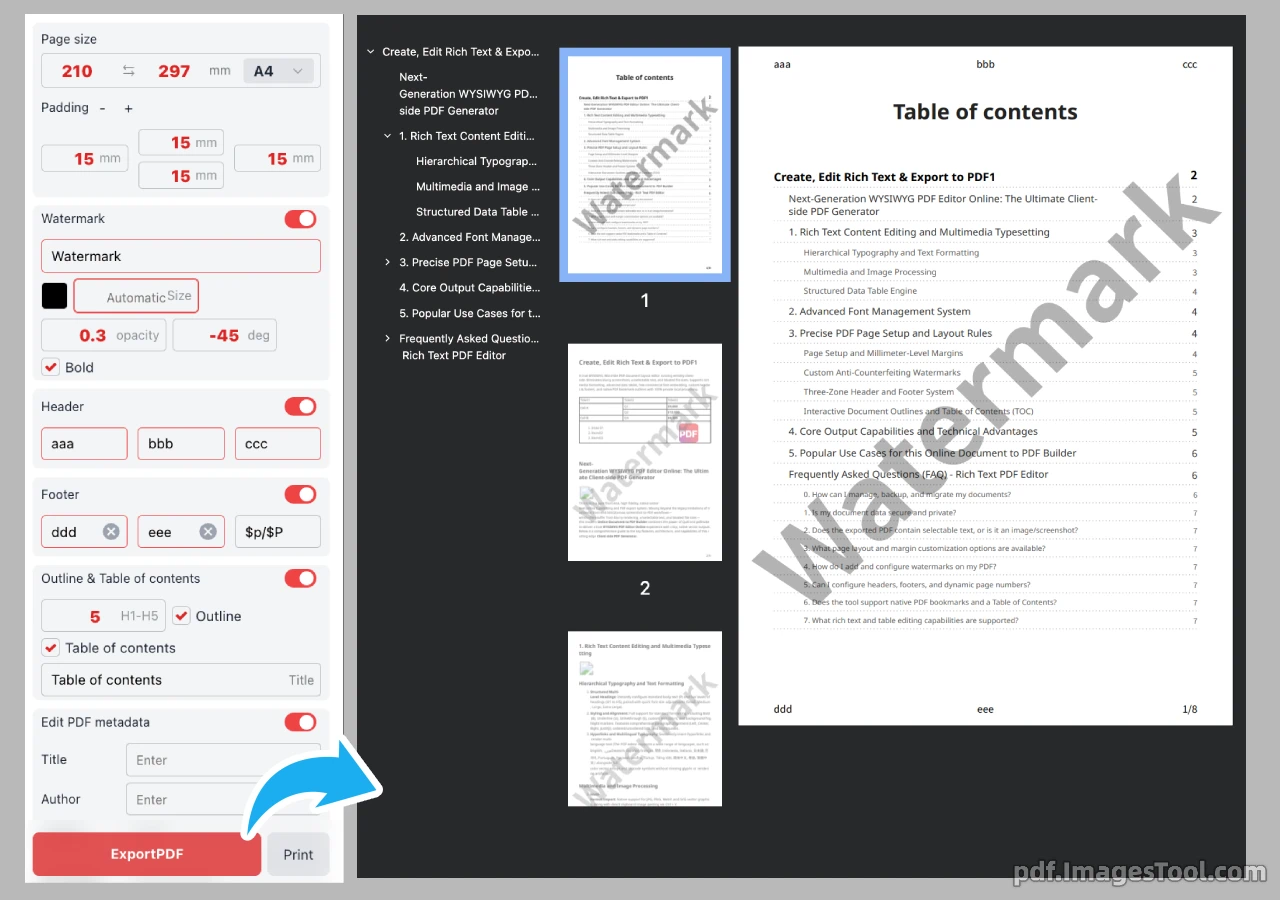
- Standard Formats and Orientation: Built-in standard paper presets (e.g., A4: 210 × 297 mm) with one-click toggling between Portrait and Landscape layouts.
- 4-Way Precision Margins: Independently adjust Top, Bottom, Left, and Right margins with millimeter accuracy to meet strict print layout standards.
Custom Anti-Counterfeiting Watermarks
- Quick Toggle: Easily enable or disable watermarks on demand.
- Multi-Parameter Customization: Configure watermark text, font color, size (with auto-fitting), opacity (0.0 to 1.0), rotation angle (e.g., -45°), and bold styling.
Three-Zone Header and Footer System
- Independent Three-Zone Layout: Headers and footers are divided into Left, Center, and Right zones for versatile metadata placement.
- Dynamic Page Numbering: Insert dynamic macros such as
$p/$Pto automatically render formatted page counts (e.g., Page 1/10).
Interactive Document Outlines and Table of Contents (TOC)
- Hierarchy Depth Control: Specify the exact heading levels (e.g., H1–H5) extracted into the document directory.
- Native PDF Bookmarks (Outlines): Automatically generate an interactive bookmark tree in PDF readers for fast navigation in long documents.
- Embedded Table of Contents (TOC): Generate a visual, indexed Table of Contents directly on the cover or initial pages with a single click.
4. Core Output Capabilities and Technical Advantages
- Native Vector PDF Generation (Client-Side): Unlike canvas-based screenshot tools, this Client-side PDF Generator directly compiles native vector primitives and text streams. The resulting PDFs feature selectable, copyable, and fully searchable text.
- Lossless Scaling and Compact File Sizes: Vector typography and SVG elements remain crisp at any zoom level, producing significantly smaller file sizes compared to image-heavy alternatives.
- Zero Server Uploads & Maximum Data Privacy: All layout computation, font parsing, and PDF compiling happen entirely inside the user's browser, keeping sensitive data private and secure.
- Native Print Support: Directly trigger the browser's native print protocol for an instant, true WYSIWYG hard-copy output.
5. Popular Use Cases for this Online Document to PDF Builder
- Enterprise Contracts and Agreements: Create legally binding agreements with searchable clauses and custom security watermarks.
- Automated Reports and Analytical Dashboards: Combine vector charts, multi-color tables, and structured headers for high-impact executive summaries.
- Technical Documentation, Manuals, and eBooks: Leverage automatic TOC generation, deep heading hierarchies, inline code/math/emoji support, and interactive PDF bookmark trees.
- Resumes, Portfolios, and Certificates: Design polished, brand-aligned documents using custom typography, millimeter margins, and high-fidelity vector printing.
Frequently Asked Questions (FAQ) - Rich Text PDF Editor
0. How can I manage, backup, and migrate my documents?
You can create blank or demo documents, duplicate copies, and delete items from the dashboard. For backup and migration, you can export individual or all documents as .json files, or import documents via .json and .zip files.
1. Is my document data secure and private?
Yes. The editor operates with 100% private local/client-side processing. All document editing, formatting, and PDF rendering take place directly within your web browser, ensuring no sensitive data is uploaded to external servers.
2. Does the exported PDF contain selectable text, or is it an image/screenshot?
It outputs true, native vector-quality PDFs. The text remains fully selectable, searchable, and copyable, eliminating blurry rasterized screenshots and bloated file sizes.
3. What page layout and margin customization options are available?
You can choose preset page sizes (such as A4) or input custom millimeter dimensions (e.g., 210 x 297 mm) with orientation toggling. You can also customize page padding (top, bottom, left, right) independently in millimeters.
4. How do I add and configure watermarks on my PDF?
Enable the Watermark toggle in the right sidebar. You can configure custom watermark text, pick colors, adjust opacity (e.g., 0.3), set rotation angles (e.g., -45 degrees), enable bold styling, and use automatic font sizing.
5. Can I configure headers, footers, and dynamic page numbers?
Yes. Both Headers and Footers offer 3-column layouts (Left, Center, Right). You can insert dynamic variables like $p/$P in the footer to automatically display the current page and total page count.
6. Does the tool support native PDF bookmarks and a Table of Contents?
Yes. The 'Outline & Table of contents' feature allows you to automatically generate a document table of contents and embed native PDF bookmark outlines based on heading tags (H1 to H5).
7. What rich text and table editing capabilities are supported?
The editor supports adding custom font families, heading tiers (H1–H5), rich text styling (bold, underline, strikethrough, text/highlight colors), alignments, ordered/unordered lists, blockquotes, hyperlinks, and images. Tables support nested content such as lists, colored text, and embedded images.