

Convert PDF to AVIF
Batch convert PDF to high-quality AVIF images, support custom AVIF width and quality
Try these now PDFs:
Does this online conversion service protect my privacy? Are the files I import safe?
Very safe, because your files never leave your device and are not uploaded. ImagesTool uses browser technology to achieve the conversion service that previously required uploading.
Everything happens only in your browser, 100% protecting your privacy.
You can do a test Convert once, then disconnect the device from the network, and convert again and you will find that everything is normal.
PDF to Others
Convert PDF to AVIF: Secure, High-Quality Batch Converter
Effortlessly transform your PDF documents into next-generation AVIF images with our advanced browser-based tool. Designed for efficiency and privacy, this converter allows you to turn PDF pages into high-efficiency AVIF files without compromising quality. Whether you are archiving documents or optimizing web images, our PDF to AVIF solution offers superior compression and clarity.
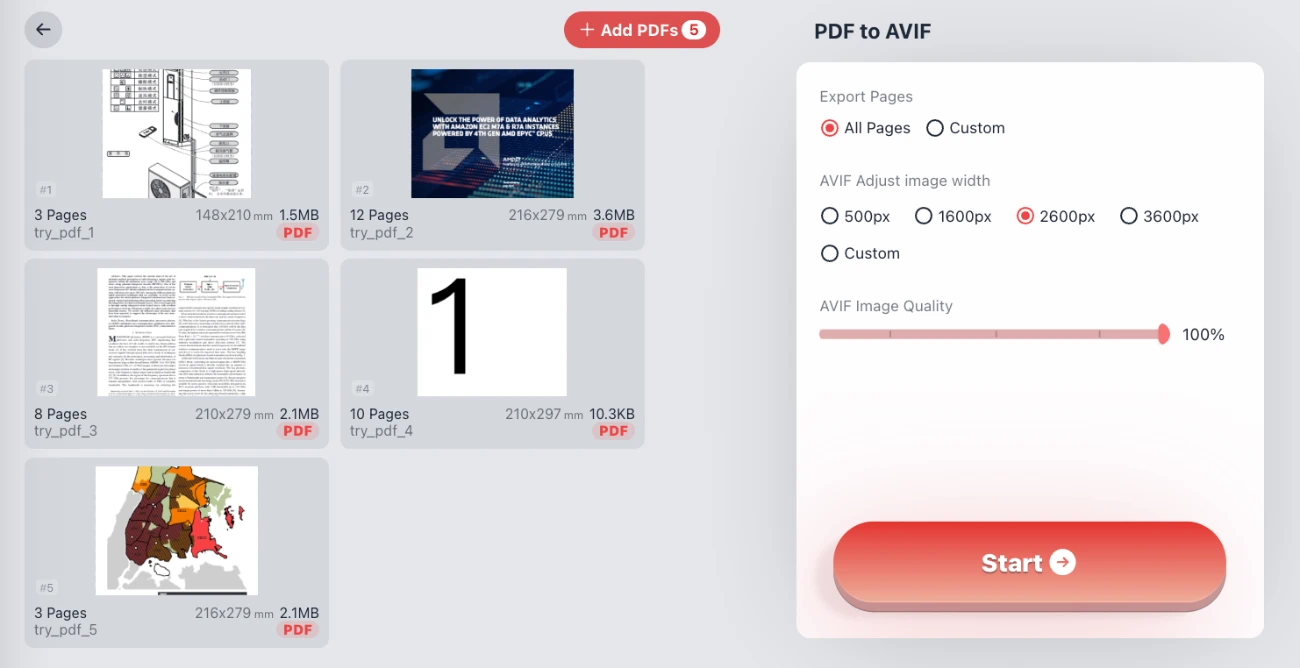
Key Features
- Batch Processing: Convert multiple PDF files at once to save time.
- Custom Output: Adjust image width (e.g., 1200px, 2600px) and fine-tune image quality using the slider.
- Selective Export: Choose to export "All Pages" or define a "Custom" range (e.g., 5, 6-10) to convert only what you need.
- Privacy First: Browser-based processing means 100% privacy security. Your files never leave your device.
- Zero Friction: No need to upload PDF, no login, and no registration required.
Q&A: Frequently Asked Questions
Is it safe to convert my private PDFs here?
Absolutely. We utilize client-side technology, meaning the file processing happens entirely within your browser. Your sensitive data is never uploaded to a server, ensuring files never leave your device.
Can I convert specific pages from a large PDF?
Yes. As shown in the tool settings, you can select "Custom" under Export Pages and input specific page numbers or ranges (e.g., 1-3, 5) to convert only the content you require to AVIF.
Do I need to install software or register?
No. This is a completely web-based tool. There is no login, no registration, and no software installation needed. Just add your PDFs and start converting immediately.