

PDF Alternate Merge Tool
Easily interleave and mix pages from PDF files. Customize the merge by inserting pages from one document into another every 1, 2, or 3 pages. You can even reverse the page order by changing "1-end" to "end-1". Perfect for quickly combining double-sided scans or merging multiple documents. Free and unlimited.
Try these now PDFs:
Does this online conversion service protect my privacy? Are the files I import safe?
Very safe, because your files never leave your device and are not uploaded. ImagesTool uses browser technology to achieve the conversion service that previously required uploading.
Everything happens only in your browser, 100% protecting your privacy.
You can do a test Convert once, then disconnect the device from the network, and convert again and you will find that everything is normal.
Merge
Free Alternate & Mix Pages,Merge PDFs by alternating pages from each PDF
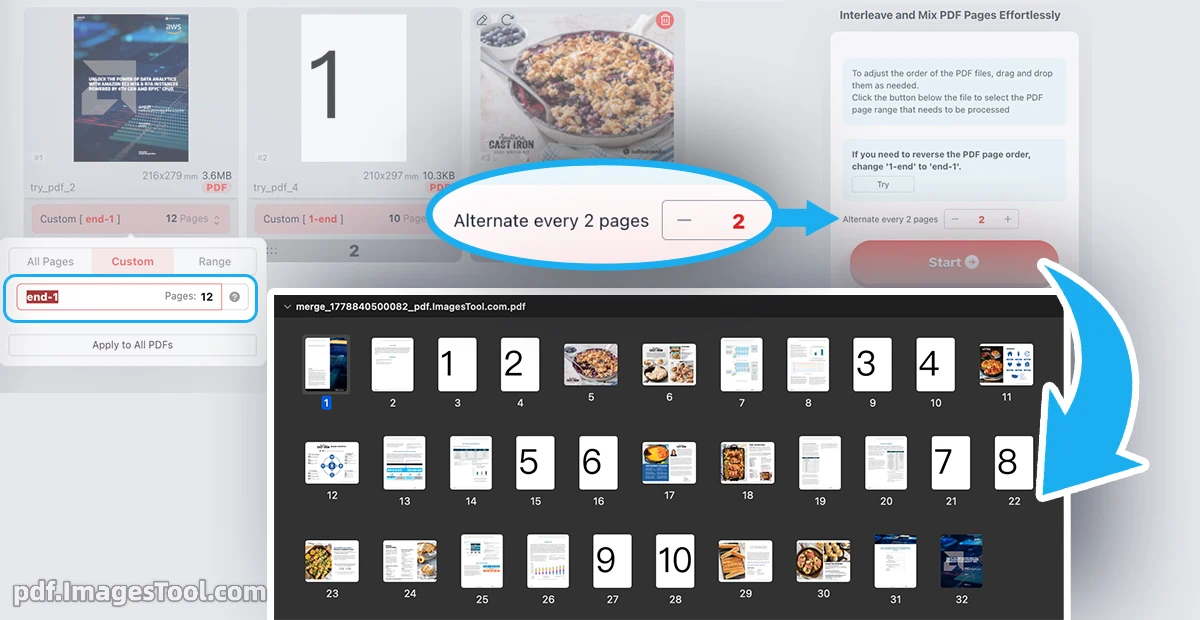
Experience unparalleled control and precision with our PDF Alternate Merge tool. Designed for efficiency, this tool allows you to seamlessly interleave pages from multiple PDF documents. Customize the merging process by setting alternating intervals of every 1, 2, or 3 pages, perfect for correctly assembling double-sided scans or integrating various documents into a single, cohesive file. You can also define specific page ranges, such as '3-end,' for targeted merging, giving you complete command over your document structure.
Your privacy is paramount. All operations are performed entirely within your browser. Your files are never uploaded, ensuring absolute confidentiality and security. No servers, no logins, no registration needed.
Follow these simple steps to merge your PDFs:
- Upload two or more PDF files into the tool.
- Define the interleaving interval (e.g., every 1, 2, or 3 pages). The default is 1.
- Optionally, specify the page ranges for each PDF you wish to merge.
- Click the 'Start' button to complete the process.
- Double-Sided Scan Assembly: Effortlessly combine separate scans of front and back pages into a single, correctly ordered document.
- Multi-Document Integration: Intelligently interleave pages from different reports, presentations, or manuscripts to create a unified and comprehensive file.
- Customized Booklet Creation: Prepare documents for printing by arranging pages in a specific alternating sequence for booklet-style layouts.
Frequently Asked Questions (QA)
Q: Is there a limit to the number of PDFs I can merge?
A: 100% Unrestricted Use
Q: How does the 'page range' feature work?
A: The page range input allows you to specify exactly which pages to include from a PDF. For example, entering '3-end' will merge all pages from the third page to the very last page of that document.
Q: Is this service truly secure?
A: Yes. The entire process runs locally in your web browser. Your sensitive documents are never transmitted over the internet, providing a completely private and secure environment for your work.