

Merge PDF & Create Bookmarks from Filenames
Merge multiple PDF files online for free, and set the custom filename of each PDF as a bookmark. Supports batch PDF merging, preserves original quality, no registration, and no watermarks. Simple and fast.
Try these now PDFs:
Does this online conversion service protect my privacy? Are the files I import safe?
Very safe, because your files never leave your device and are not uploaded. ImagesTool uses browser technology to achieve the conversion service that previously required uploading.
Everything happens only in your browser, 100% protecting your privacy.
You can do a test Convert once, then disconnect the device from the network, and convert again and you will find that everything is normal.
Merge
Merge PDF Files and Create Bookmarks from Filenames
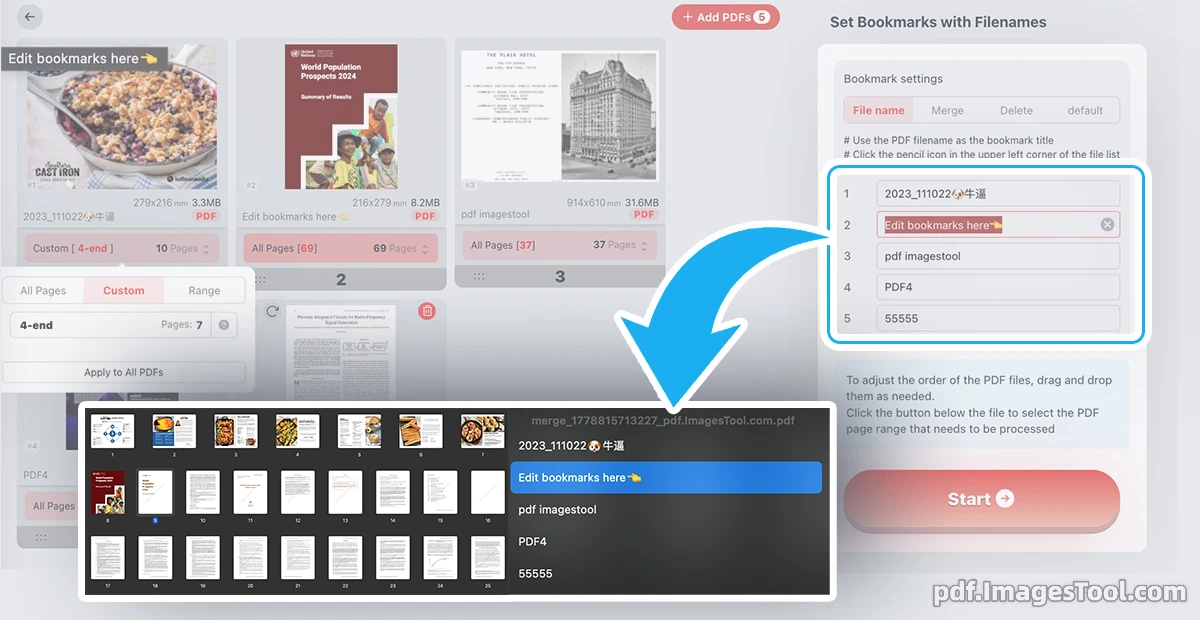
Instantly merge multiple PDF files into one professional document while automatically turning each filename into clickable bookmarks. Perfect for organizing reports, manuals, research papers, or any multi-document project. Preserve original quality, layouts, fonts, and formatting with zero loss. No software installation required — everything runs instantly in your browser.
Whether you're combining chapters, sections, or separate files, our tool intelligently creates a navigable table of contents using your original filenames. You can also customize page ranges (e.g., pages 3-20 from File A and 10-end from File B) for precise control over the final output.
Complete privacy and security. This tool runs 100% locally in your browser. No files are uploaded to any server, no registration, no login, and no data tracking. Your documents never leave your device.
- Select Files: Upload multiple PDF files in the order you prefer (drag & drop supported).
- Customize (Optional): Set custom page ranges for each file and edit bookmark names if needed.
- Merge Instantly: Click merge — the tool processes everything locally and generates your new PDF with embedded bookmarks.
- Download: Save the merged file with preserved quality and full navigation support.
Core Features
- Filename Bookmark Editing
Customize bookmark text if you want friendlier names than the original filenames, creating a clean, clickable table of contents in the final document. - Custom Page Ranges
Specify exact pages for each file (e.g., "3-20", "10-end", or individual pages) to merge only the content you need. - Original Quality
Preservation
Retains full PDF quality, fonts, images, hyperlinks, and layout without compression or artifacts. - Drag & Drop
Reordering
Intuitively reorder files and adjust settings before merging for perfect document structure. - Batch
Merging
Combine dozens of PDFs quickly with support for large files and complex documents. - Free & No Limits
No watermarks, no file size limits, no daily quotas — completely free to use.
Frequently Asked Questions (FAQ)
A: During the merge process, each input PDF is automatically added as a top-level bookmark using its original filename. You can edit these names before merging if desired.
A: Yes. For each file, you can define custom ranges like "1-15", "10-end", or even non-continuous pages. The final PDF will contain only the selected content in your chosen order.
A: Absolutely safe. The entire process runs locally in your browser. No files are uploaded, stored, or transmitted to any server. Once you close the page, all processing data is cleared.
A: Yes. We preserve vector graphics, fonts, hyperlinks, layers, and all visual elements at 100% original quality.