

PDF Odd and Even Pages Merger
Effortlessly interleave two PDF documents (odd and even pages). Specifically designed for double-sided scans, it restores the correct page order with one-click alternating arrangement and supports manual adjustments to fit different scanning habits.
Try these now PDFs:
Does this online conversion service protect my privacy? Are the files I import safe?
Very safe, because your files never leave your device and are not uploaded. ImagesTool uses browser technology to achieve the conversion service that previously required uploading.
Everything happens only in your browser, 100% protecting your privacy.
You can do a test Convert once, then disconnect the device from the network, and convert again and you will find that everything is normal.
Merge
How to merge two paper PDFs with odd and even pages?
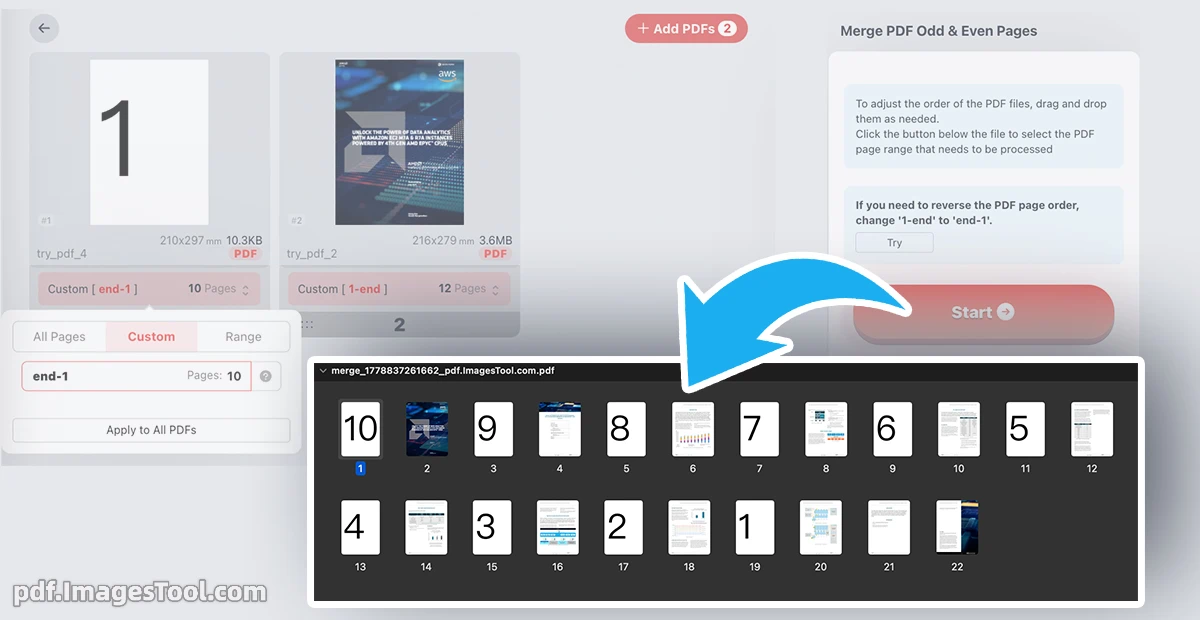
Our PDF Interleave tool provides a seamless solution for merging two separate documents into one perfectly ordered file. Specifically designed for users who deal with double-sided scanned documents, this utility eliminates the tedious task of manually reordering pages. By alternating between your odd-page and even-page files, it restores your original document structure in seconds, ensuring your professional reports and archives are ready for immediate use.
Your data privacy is our top priority. This tool runs entirely within your browser using local processing technology
- Step 1: Upload Files.
Select your PDF containing odd-numbered pages and your PDF containing even-numbered pages. - Step 2: Adjust Settings.
Simply drag and drop to adjust the order of the PDF files. Review the preview and choose the order ,if your scanned files require reversing.Please change "1-end" to "end-1". - Step 3: Process & Download.
Click the 'Start' button and download your perfectly interleaved document instantly.
Frequently Asked Questions (QA)
Q: Is this service really free and private?
A: Yes. The tool is 100% free, and because it processes files locally in your browser, your documents are never transmitted over the internet.
Q: Are there any limits on file size or page count?
A: As a browser-based tool, Generally, it completes very quickly. For large PDFs, tests show that merging two PDFs with a total of 5170 pages takes only 13 seconds.so,PDFs of several hundred pages can be completed almost instantly.