

Combine PDF Pages Vertically into One Long Page
An efficient tool to combine PDF pages vertically while retaining native PDF format. It supports combining all pages of a PDF document sequentially into a single continuous page. You can preserve the native PDF layout or convert it to scanned image format, customize page width, image quality, divider or border thickness, and background color to easily create long PDF pages.
Try these now PDFs:
Does this online conversion service protect my privacy? Are the files I import safe?
Very safe, because your files never leave your device and are not uploaded. ImagesTool uses browser technology to achieve the conversion service that previously required uploading.
Everything happens only in your browser, 100% protecting your privacy.
You can do a test Convert once, then disconnect the device from the network, and convert again and you will find that everything is normal.
Layout
Free Online PDF Vertical Combiner - Combine PDF into One Long Page
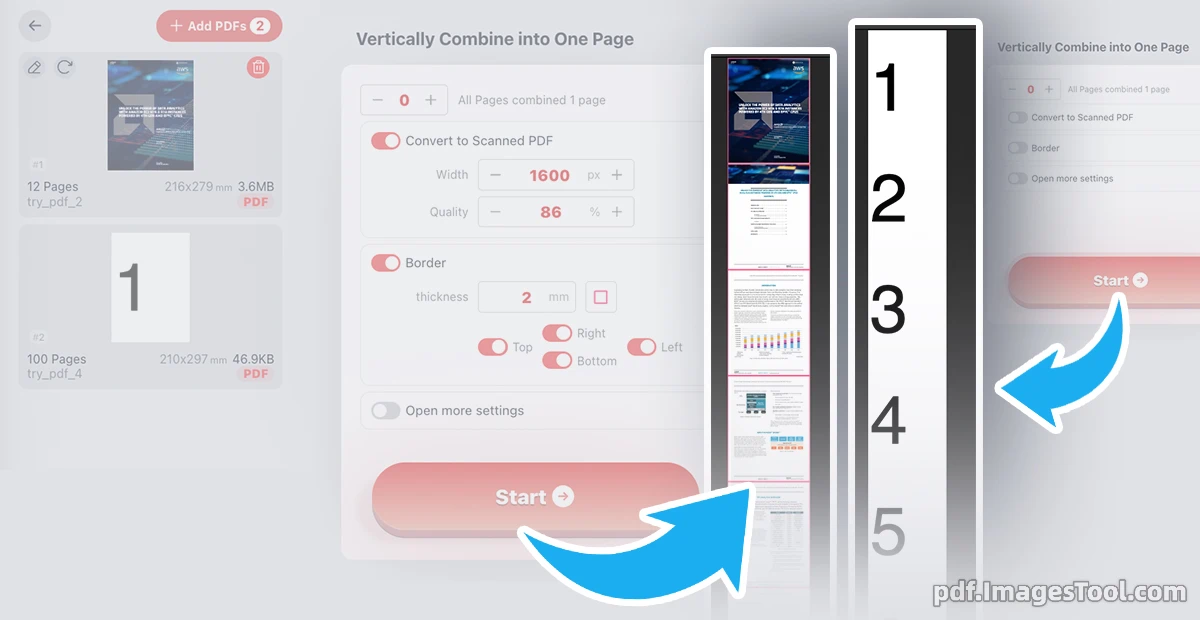
As someone who frequently handles fragmented documents, I highly recommend this free online PDF vertical combiner.
It seamlessly combines multiple PDF pages vertically from top to bottom into a single continuous scrolling page. What makes it incredibly powerful are the advanced customization options. You can retain the native PDF format for searchable text or toggle the 'Convert to Scanned PDF' feature to adjust the page width (e.g., 1600 px) and image quality (e.g., 86%). Furthermore, the tool allows you to add custom borders—you can specify the thickness (like 2 mm), pick a color, and choose specific placements (such as the bottom edge) to neatly divide your combined pages.
Your data security is guaranteed. This tool runs 100% locally in your browser—no server uploads, no registration, and no login required.
Here is how to seamlessly create long PDF pages:
- Select and load your PDF file into your browser.
- Set how many pages to combine (leave it at 0 to combine all pages into 1).
- Enable 'Convert to Scanned PDF' or 'Border' to fine-tune width, quality, and dividers.
- Click 'Start' button and download your continuous PDF instantly.
- Continuous Reading: Perfect for merging lengthy reports or comics into one continuous scrolling PDF, eliminating frustrating page breaks on mobile devices.
- Infographic Creation: Stitch multiple presentation slides or design mockups together into a single, cohesive long page presentation.
- Document Archiving: Vertically combine scanned receipts or invoices using the scanned format feature to create neat, easily viewable digital archives.
- Web Design Previews: Combine sliced web page designs and add custom bottom borders to clearly distinguish different sections of a website mockup.
Frequently Asked Questions (QA)
A: Absolutely. This tool processes your files entirely locally within your browser. There is no server upload, ensuring your sensitive data never leaves your device.
A: Yes! By turning on the 'Border' toggle, you can adjust the border thickness, select a custom color, and apply it to specific sides (like the bottom) to create perfect divider lines.
A: If you choose to retain the native PDF format, your text remains fully selectable and searchable. If you turn on 'Convert to Scanned PDF', the pages will be rendered as high-quality images based on your custom width and quality settings.