

Split PDF Pages Horizontally
Precisely split PDF pages from top to bottom into two independent pages by dragging the adjustable split line. You can also click on the split area to select or deselect the top half, making it perfect for scanned documents, invoices, two-column books, or cards.
Try these now PDFs:
Does this online conversion service protect my privacy? Are the files I import safe?
Very safe, because your files never leave your device and are not uploaded. ImagesTool uses browser technology to achieve the conversion service that previously required uploading.
Everything happens only in your browser, 100% protecting your privacy.
You can do a test Convert once, then disconnect the device from the network, and convert again and you will find that everything is normal.
Layout
Free Horizontal PDF Splitter: Precisely Split Pages in Half Locally
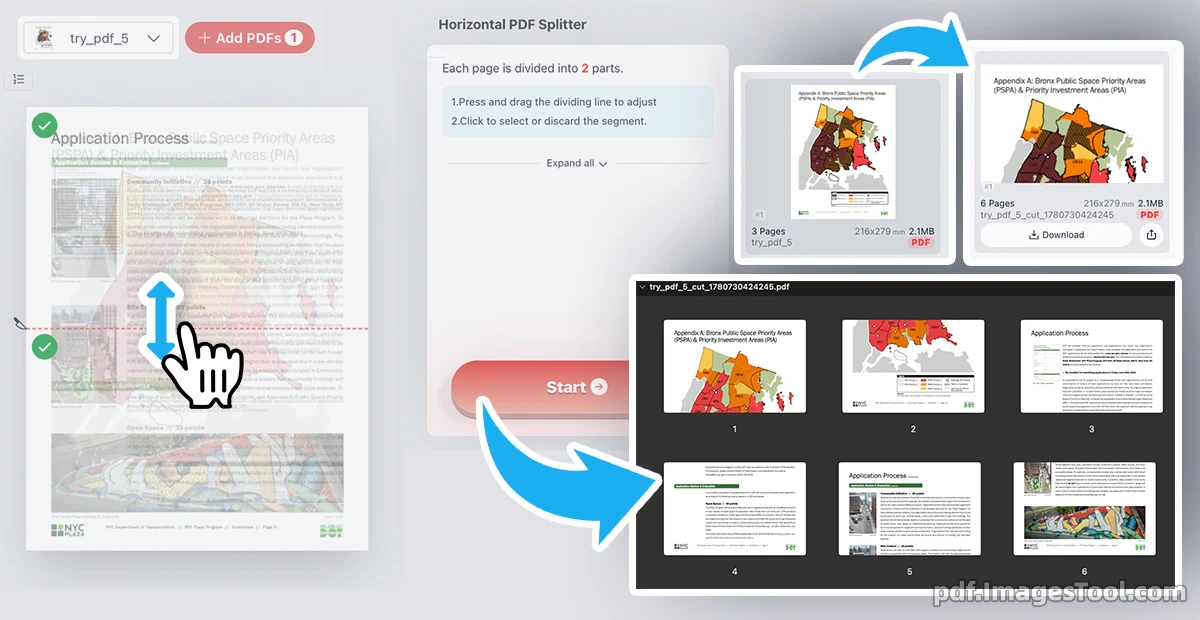
As someone who frequently deals with scanned documents, finding a reliable way to split in half horizontally is a massive time-saver. This Horizontal PDF Splitter allows you to visually drag an adjustable dividing line to seamlessly cut pages from top to bottom, transforming one layout into two independent pages. Whether you need to split evenly in half or customize the cut area, you can easily click to select or discard specific segments, giving you absolute control over how you split your files into two.
Your data is completely safe. This tool runs entirely in your local browser—no uploads, no servers, no registration, and no login required.
Follow these quick steps to cut your document:
- Add your PDF file into the workspace.
- Press and drag the visual dividing line up or down to adjust your split point.
- Click to select or discard the specific top or bottom segment.
- Hit the 'Start' button to instantly generate and download your split pages.
Perfect For Your Workflow
- Scanned Receipts: Quickly cut long scanned invoices or multi-part bills into two separate, neatly organized pages.
- Top-Bottom Cards: Easily split double-sided flashcards or design assets where the layout needs to be separated vertically.
- Financial Tables: Precisely split tall, continuous reports or two-part charts without losing any visual quality.
Frequently Asked Questions (QA)
Q: How do I split a PDF in half horizontally?
A: Simply upload your document, drag the adjustable line to your preferred cut point, choose which segments you want to keep, and click Start. The tool will instantly split it into two pages.
Q: Is it safe to process confidential documents here?
A: Yes, absolutely. Everything is processed 100% locally on your device's browser. We do not use servers, and no files are ever uploaded, ensuring total data privacy.
Q: Can I choose to discard the bottom half of the page?
A: Yes! As shown in the tool, you can simply click on any segmented area to discard it before exporting, keeping only the exact half you need.