

Combine 2 PDF Pages Synchronous Side-by-Side
Combine corresponding pages of multiple PDFs horizontally. Sequentially combine corresponding pages of PDF A and PDF B side-by-side (A1+B1, A2+B2) to generate a new PDF with double-width pages. Great for document comparison and bilingual layouts.
Try these now PDFs:
Does this online conversion service protect my privacy? Are the files I import safe?
Very safe, because your files never leave your device and are not uploaded. ImagesTool uses browser technology to achieve the conversion service that previously required uploading.
Everything happens only in your browser, 100% protecting your privacy.
You can do a test Convert once, then disconnect the device from the network, and convert again and you will find that everything is normal.
Layout
Free Combine PDF Pages Side-by-Side Stitching Tool
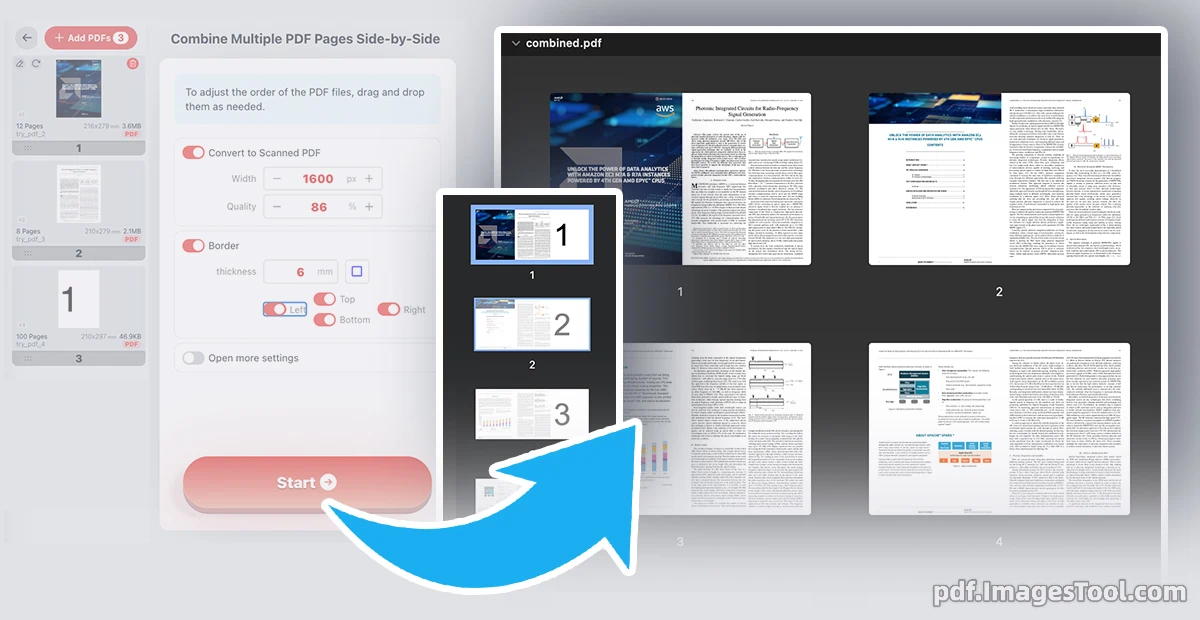
Redefine your document workflow with our advanced engine designed for Synchronous Side-by-Side Stitching. Unlike standard merging that simply appends files sequentially, this tool enables seamless Dual-File Canvas Stitching, merging corresponding pages horizontally onto a single, wider canvas. By locking the page-by-page synchronization—aligning Page 1 of Document A directly next to Page 1 of Document B—it delivers a precise Parallel Page Merging experience. This is the professional choice for Mirror/Comparison Stitching, making it ideal for translation reviews, version comparisons, and high-resolution side-by-side layouts without any loss in quality.
This tool runs entirely in your browser locally. No files are uploaded ; no registration or login required—100% private and secure.
- Import two or more PDF documents.
- Drag to change the position of the PDF.
- Click the 'Start' button.
- Legal & Contract Comparison: Combine two versions of a document side-by-side for easy redline auditing.
- Bilingual Alignment: Create parallel-text documents by stitching source and translated pages together.
- Technical Documentation: Combine detailed schematics with explanatory text onto a single, wide-view page.
The purpose of arranging two PDFs horizontally.
Frequently Asked Questions (QA)
A: No. All 'combine' operations happen within your browser's memory. Your files are never sent to a server.
A: Yes, the tool automatically adjusts the canvas height to accommodate the tallest page during the stitching process.
A: There are no restrictions, but it is recommended to have no more than 5 PDFs.
Q: What happens if two PDFs side-by-side have different numbers of pages?A: The PDF with more pages will be arranged side-by-side according to the rules until the last page.