

Split and Merge Any Pages from Multiple PDFs into One
Select and extract any pages from multiple PDFs, then instantly merge them into a brand new PDF file. All processing is done locally in your browser, so your files are never uploaded to a server, ensuring complete privacy and security. No registration or login required—it's ready when you are. Fast, simple, and efficient.
Try these now PDFs:
Does this online conversion service protect my privacy? Are the files I import safe?
Very safe, because your files never leave your device and are not uploaded. ImagesTool uses browser technology to achieve the conversion service that previously required uploading.
Everything happens only in your browser, 100% protecting your privacy.
You can do a test Convert once, then disconnect the device from the network, and convert again and you will find that everything is normal.
Split
Split Any Pages from Multiple PDFs and Merge into One
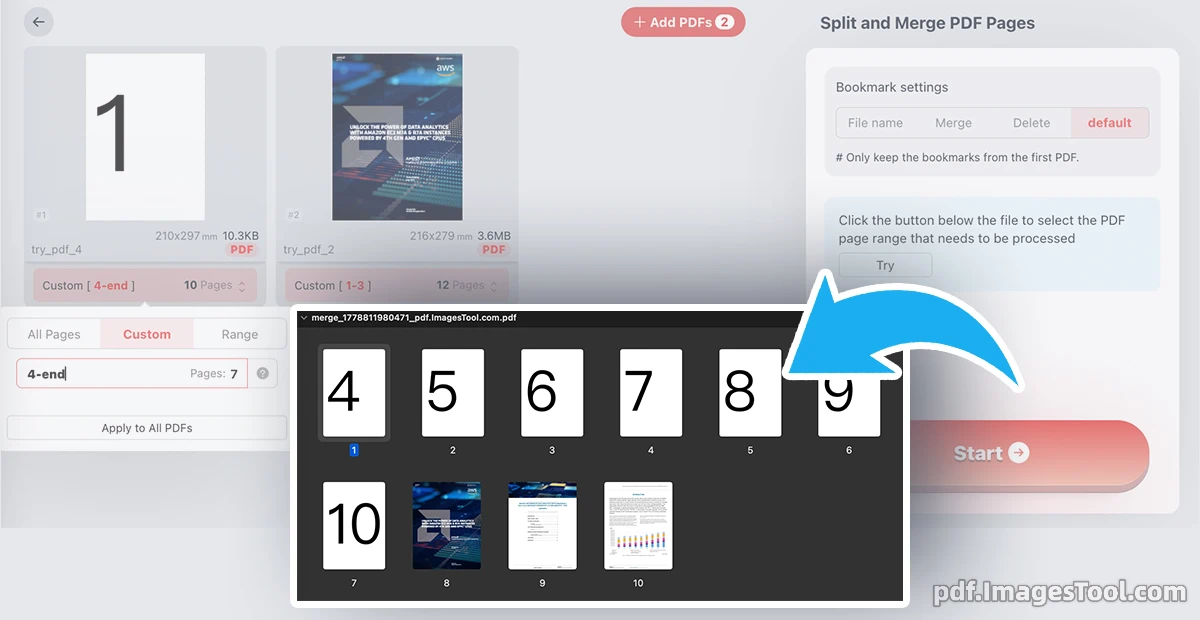
Instantly extract and combine any pages from multiple PDF files into a single, perfectly organized document — all directly in your browser. Whether you need specific chapters from different reports, selected pages from contracts, or custom page ranges from various sources, this tool gives you precise control with zero hassle.
Support flexible page ranges like 3-20 for one file and 10-end for another. No software installation, no complicated settings — just fast, accurate PDF page merging that works instantly.
Privacy-first and completely secure: Everything runs locally in your browser. Your files are never uploaded to any server, and no data is stored or transmitted. No login, no registration required — open the page and start working immediately.
- Select Files: Upload multiple PDF documents you want to work with.
- Define Page Ranges: For each PDF, specify exact pages or ranges (e.g., 1-5, 12, 20-end).
- Preview & Adjust: Review your selected pages in order and reorder if needed.
- Merge & Download: Click to generate the new combined PDF instantly — ready to save or share.
Core Features
- Multi-PDF Page Extraction
Freely select and pull any pages or custom ranges from as many PDF files as you need. - Flexible Page Range Support
Use simple syntax like 3-20, 10-end, or individual pages (e.g., 1,5,12) for precise control. - Browser-Local Processing
All operations happen directly in your browser for maximum speed and complete privacy. - Instant Merge & Reordering
Combine extracted pages in any order and generate a clean, professional single PDF file. - No Quality Loss
Preserves original PDF quality, formatting, text, and images perfectly. - Lightning Fast & Free
No limits on file size or number of pages — process large documents in seconds.
Frequently Asked Questions (FAQ)
A: Yes. The entire process runs 100% locally in your browser. Files are never uploaded to any server, stored, or shared. Your privacy is fully protected.
A: No installation and no registration required. Just open the webpage and start working immediately.
A: For each uploaded PDF, simply enter your desired page ranges (e.g., '3-20' or '10-end'). You can mix ranges from multiple files and reorder them before merging.
A: Your original PDFs remain completely unchanged. The tool only creates a new merged file with your selected pages.
A: There are no strict limits. The tool is optimized for fast performance even with large documents, though very large files depend on your device's available memory.
A: Yes. It works on modern desktop and mobile browsers, though the best experience is on desktop for handling multiple files.