

Split PDF by Page Count Tool
Quickly divide long, multi-page PDFs into smaller chunks by custom page intervals (e.g., every 10 or 100 pages) in just seconds. Each extracted file automatically features a page number prefix for precise identification, making it perfect for breaking down large documents to feed into AI tools. Processing happens entirely locally in your browser—100% free, lightning-fast, and guarantees total document privacy. No login or registration needed. Ready to use instantly!
Try these now PDFs:
Does this online conversion service protect my privacy? Are the files I import safe?
Very safe, because your files never leave your device and are not uploaded. ImagesTool uses browser technology to achieve the conversion service that previously required uploading.
Everything happens only in your browser, 100% protecting your privacy.
You can do a test Convert once, then disconnect the device from the network, and convert again and you will find that everything is normal.
Split
Split PDF by Custom Pages: Fast, Secure, and Local Chunking Tool
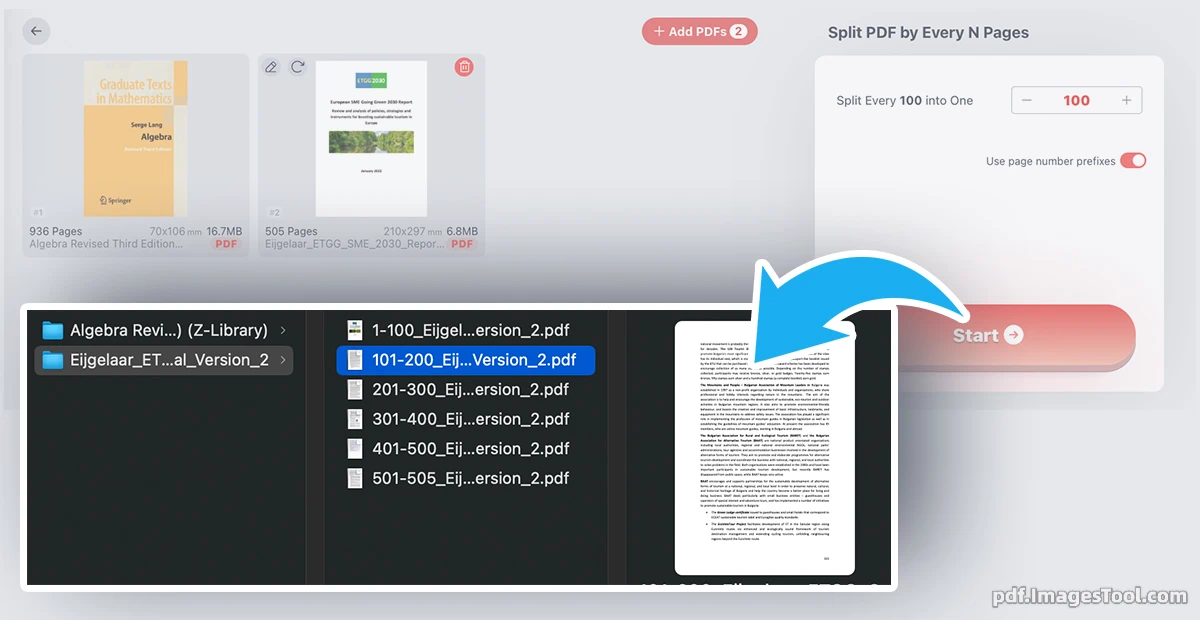
Struggling with massive PDF documents? Our Split PDF by Pages tool is designed to effortlessly chunk hundreds of pages into smaller, manageable files in mere seconds. By allowing you to set a custom page count (such as every 10 or 100 pages), it automatically divides your long document and prefixes each new file with its corresponding page range for seamless identification. Whether you are organizing massive files, sharing specific sections, or breaking down lengthy PDFs to feed into AI tools for further processing, this efficient tool streamlines your workflow instantly.
Security and privacy are at the core of our service. Unlike traditional online PDF editors, our tool processes everything entirely locally within your browser. Your sensitive files are never uploaded to any remote server, guaranteeing 100% data privacy. Best of all, it is completely free to use—no registrations, no logins, and no hidden fees. Simply open the page and start splitting your PDFs safely, quickly, and securely.
Core Features
- Custom Page Chunking: Input your desired page quantity (e.g., 10, 50, or 100 pages), and the tool will automatically calculate and split your entire document into multiple files of that exact length.
- Smart File Naming: Output files are automatically prefixed with their respective page numbers, making it incredibly easy to identify, sort, and organize your newly split documents.
- AI-Workflow Optimized: Perfectly reduce file sizes and page counts to bypass token limits when feeding lengthy documents into AI tools like ChatGPT or Claude for analysis.
- Organized ZIP Export: Download all your split PDF pages neatly packed in a single ZIP archive. If you process multiple PDFs at once, the files will be automatically sorted into respective folders.
- Lightning-Fast Processing: Experience ultra-fast speeds that can reliably split hundreds of pages into multiple small PDFs in just a few seconds.
- 100% Local & Secure: Powered by modern web technology, all file processing happens locally on your device. No data leaves your browser, ensuring absolute privacy without the need to log in or register.
Frequently Asked Questions (QA)
Q: Is my document completely safe and private?
A: Yes, absolutely. Our tool runs 100% locally in your web browser. Your PDF files are never uploaded, stored, or processed on any external server. Your sensitive data remains entirely on your device.
Q: Do I need to register or log in to use the tool?
A: No registration, login, or subscription is required. Our tool is completely free and "ready-to-use" the moment you open the webpage.
Q: How does the custom page splitting work?
A: Simply import your PDF, input your desired page chunk size (for example, "20"), and click start. The tool will automatically chunk the entire document into multiple smaller PDFs, each containing exactly 20 pages (with the final file containing the remainder).
Q: How do I download the split files?
A: Once the splitting process is complete, you will receive a single ZIP archive containing all the newly generated PDF files. If you split multiple different PDFs at once, the ZIP file will neatly organize them into separate corresponding folders.
Q: Why is this tool particularly useful for AI applications?
A: Most AI chatbots and analysis tools have strict token or file size upload limits. By using our tool to chunk a massive 500-page PDF into smaller 50-page sections, you can easily feed the data into AI assistants step-by-step without hitting any upload restrictions.