

Custom Split PDF Pages by Page Number
A free and secure online tool to extract and split PDF pages by entering specific page numbers. You can freely combine, sort, or select pages (e.g., enter "1,3,5-end,even") and merge the selected ranges into a single PDF or divide them into separate independent files. Output files automatically get page number prefixes for easy identification. The entire process is handled locally in your browser at lightning speed, ensuring your privacy is fully protected. Ready to use instantly with no registration required.
Try these now PDFs:
Does this online conversion service protect my privacy? Are the files I import safe?
Very safe, because your files never leave your device and are not uploaded. ImagesTool uses browser technology to achieve the conversion service that previously required uploading.
Everything happens only in your browser, 100% protecting your privacy.
You can do a test Convert once, then disconnect the device from the network, and convert again and you will find that everything is normal.
Split
Advanced Guide to Page Extraction Rules
Our extraction engine supports highly flexible page operation logic. You can combine "include", "range", "countdown", "odd/even", and "exclude" rules like building blocks to precisely extract any page collection you want.
🌟 1. Basic Pages and Ranges
Empty string- Smart Default: When nothing is entered, all pages of the document are extracted by default.5- Single page: Extracts only page 5.1, 3, 5- Multi-page selection: Use commas to precisely extract pages 1, 3, and 5.1-10- Continuous range: Extracts everything from page 1 to page 10.10-1- Reverse extraction: Extracts and reorganizes pages 10 to 1 in completely reverse order.
🔄 2. Dynamic Positioning and Countdown
No matter how many pages the document has, you can easily target the end without knowing the exact total page count.
15-end(or15-z) - Dynamic range: Extracts from page 15 until the last page of the document.-1(orr1) - Last page targeting: Extracts the last page (1st page from the end).-5(orr5) - Countdown single page: Extracts the 5th page from the end.-5--1(orr5-r1) - Countdown range: Extracts the 5 continuous pages from the 5th to the 1st page from the end.-1--5(orr1-r5) - Countdown reverse: Extracts the last 5 pages in reverse order.
✂️ 3. Smart Odd/Even Page Splitting
even- Global even: Extracts all even pages in the entire document (2, 4, 6...).odd- Global odd: Extracts all odd pages in the entire document (1, 3, 5...).1-100:even- Local even: Extracts even pages only within the range of pages 1 to 100.-10-end:odd- Dynamic local odd: Extracts all odd pages in the last 10 pages of the document.
🚫 4. Blacklist Exclusion (Ban Syntax)
Add ban or ! before a rule to trigger exclusion logic. When you only write exclusion rules, the system automatically uses "all pages" as the base for cropping.
ban5(or!5) - Single page exclusion: Extracts all pages, but drops page 5.!10-20- Range exclusion: Extracts all pages, but hollows out pages 10 to 20.!end(orban-1) - Exclude last page: Extracts all pages except the last one (often used to remove the back cover).!even- Attribute exclusion: Excludes all even pages (equivalent to keeping only odd pages).
🚀 5. Ultimate Combination "Black Magic"
The engine first merges all "include" rules, then precisely deducts "exclude" rules, and finally auto-deduplicates to help you complete extremely complex tasks:
1-50, !10-15, !20
👉 Scenario: Extract the first 50 pages, but skip pages 10-15 and page 20.even, !-3-end
👉 Scenario: Extract all even pages from the entire text, but absolutely avoid the last 3 pages (even if they contain even numbers).1, 3, 5, 10-end:even, !-1
👉 Scenario: Extract pages 1, 3, 5, plus all even pages from page 10 to the end, but firmly exclude the last page.1-10, 1-10
👉 Scenario (Auto-deduplication): Even if rules overlap, the engine automatically deduplicates to safely output pages 1-10 without generating redundant pages.
Split and Extract PDF Pages with Custom Page Numbers
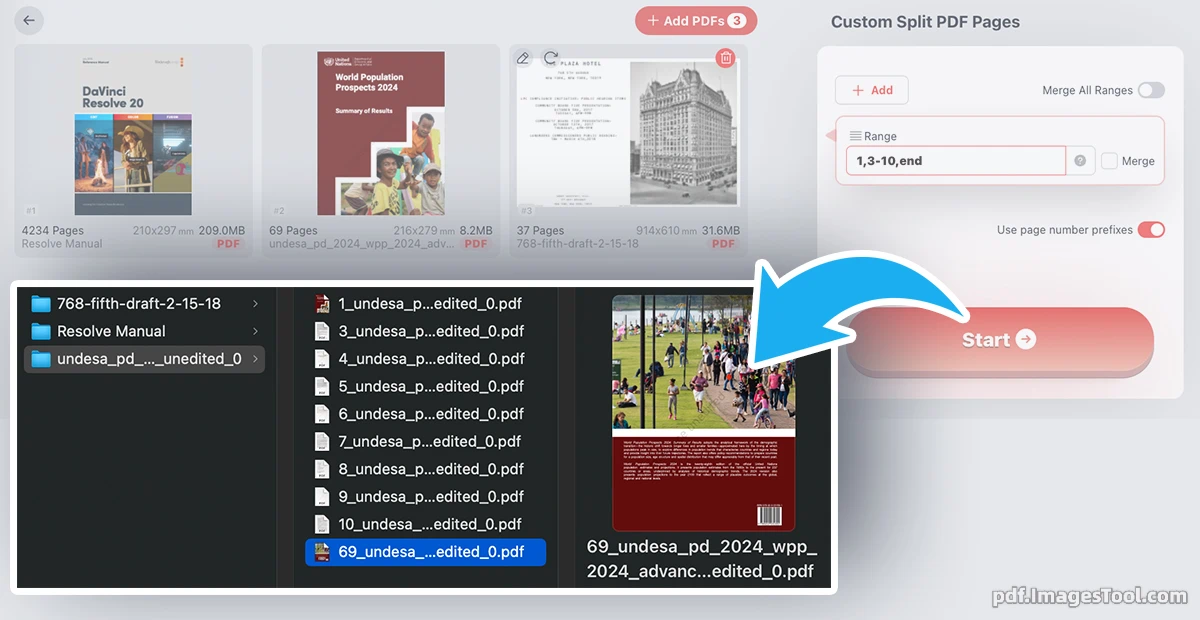
Experience professional-grade document manipulation with our advanced PDF extraction engine. Designed from the ground up for unparalleled precision and flexibility, this tool goes far beyond basic splitting. It empowers you to extract, combine, and sort specific pages using powerful custom syntax—such as "1, 3, 5-end, even". Whether you need to piece together chapters from a massive report or isolate highly specific data points, our robust algorithm handles it flawlessly, processing up to 100 pages per second and delivering perfectly organized files in an instant.
Your privacy is our absolute priority. Unlike traditional cloud-based tools that force you to upload sensitive documents, our custom PDF splitter is engineered to run entirely within your local web browser. There are no server uploads, no cloud storage, and zero data tracking. Your files never leave your device, guaranteeing enterprise-level security. Enjoy this blazing-fast, strictly local processing completely free of charge—with no registration, no login, and no installation required. Just open and start working securely.
Core Features
- Advanced Selection Syntax: Effortlessly isolate, reorder, and combine pages using intuitive commands (e.g., "1, 3, 5-end, even") to build exactly the document you need.
- Flexible Output Options: Choose to merge your selected page ranges into a single, cohesive PDF document, or split them into multiple independent files based on your workflow.
- Smart Page Prefix Naming: When splitting into multiple files, outputs are automatically generated with smart prefixes indicating their original page numbers, making identification effortless.
- Blazing Fast Local Processing: Capable of splitting and extracting up to 100 pages per second, handling even the most massive PDF documents in the blink of an eye.
- Organized ZIP Delivery: Download all your processed files neatly packed in a single ZIP archive. If you are generating multiple PDFs, they will be intelligently organized into respective folders.
Frequently Asked Questions (QA)
A: Absolutely. Our tool operates completely locally within your web browser using advanced client-side technology. Your files are never uploaded to any external servers, ensuring zero risk of data leakage or interception. What happens on your device, stays completely on your device.
A: You can type specific numbers, ranges, or patterns. For example, "1,3" extracts pages 1 and 3. "5-10" extracts pages 5 through 10. You can also use "end" to specify the last page, or "even"/"odd" to filter specific pages. A full command like "1,3,5-end,even" gives you total freedom to pick and reorder exactly what you need.
A: No, our custom PDF splitter is 100% free to use. There are no hidden fees, no strict file size limitations, and you do not need to register or log in. Simply open the web page, drag and drop your file, and start extracting immediately.