

Extract Odd Pages from PDF - Free Online PDF Splitter
Free online tool to quickly extract all odd pages (1, 3, 5, 7...) from PDF files and automatically delete even pages. Supports batch processing while perfectly preserving the original text, images, layout, hyperlinks, and annotations. Easy to use with no registration required. Ideal for organizing double-sided scanned documents, creating handouts, archiving contracts, and print optimization.
Try these now PDFs:
Does this online conversion service protect my privacy? Are the files I import safe?
Very safe, because your files never leave your device and are not uploaded. ImagesTool uses browser technology to achieve the conversion service that previously required uploading.
Everything happens only in your browser, 100% protecting your privacy.
You can do a test Convert once, then disconnect the device from the network, and convert again and you will find that everything is normal.
Split
Split PDF by Odd Pages Online - Extract PDF Odd Pages Tool
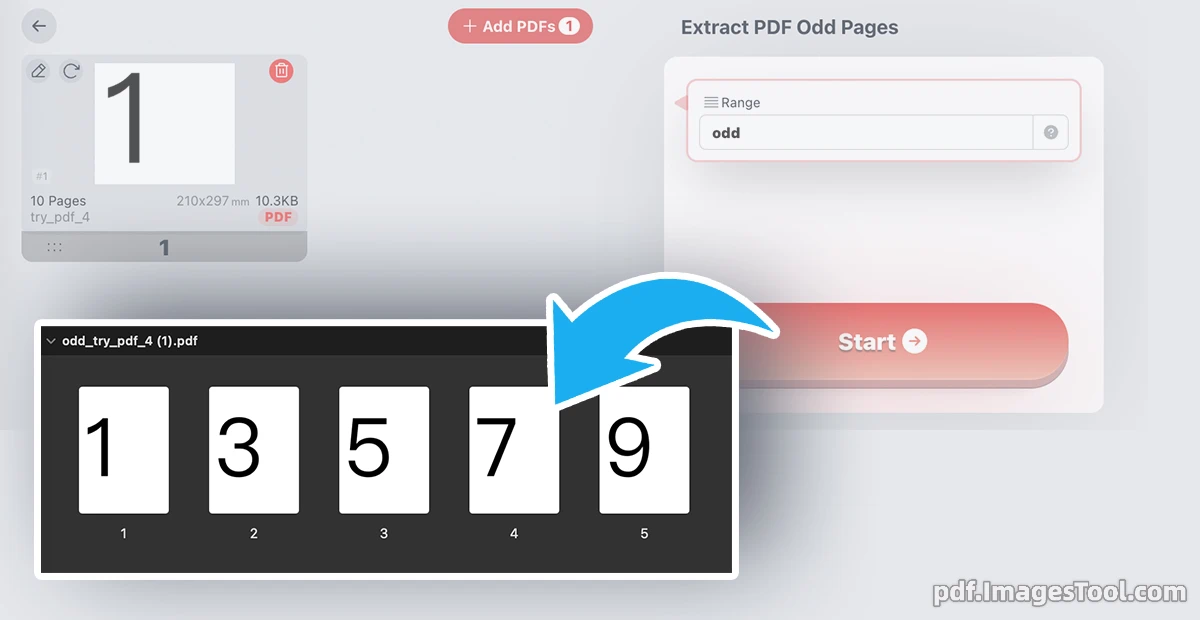
This PDF odd page extraction tool runs entirely locally in your browser, helping you quickly and accurately extract all odd pages (1, 3, 5, 7...) from PDF documents while automatically discarding even pages. Whether you are dealing with double-sided scanned documents, handouts, contracts, or e-books, it completes the splitting instantly, perfectly preserving the original text, images, formatting, hyperlinks, and annotations.
No file upload required, no registration or login needed. The entire processing is done locally in your browser, meaning your files never leave your device, ensuring 100% data privacy and security.
The process is incredibly simple:
- Click 'Choose PDF File' or drag and drop the PDF file directly onto the page
- Click the 'Start' button and wait a few seconds
- Click the 'Download ZIP' button
Main Features
- Smart Odd Page Extraction
Automatically identifies and retains all odd pages in the PDF, accurately removing even pages. Supports processing of extra-large files. - Perfect Format Preservation
100% retains all elements of the original PDF, including text, images, layout, hyperlinks, annotations, and bookmarks. - Batch Processing Support
Supports uploading multiple PDF files simultaneously to extract odd pages in bulk at once, significantly boosting your work efficiency. - Lightning-Fast Processing Experience
Optimized with WebAssembly technology for blazing-fast processing speeds, providing second-level responses even for documents with hundreds of pages.
Frequently Asked Questions (FAQ)
A: Organizing double-sided scanned documents (keeping only the front/odd pages), extracting single-sided content for handouts, contracts, and book production, printing optimization (printing only odd pages), and document splitting and archiving.
A: Yes. All PDF processing is completed locally in your browser. Your files never leave your computer.
A: It takes only 5-6 seconds to split PDF files of hundreds of megabytes or even thousands of pages. The actual processing limit depends on your device's RAM capacity.
A: Yes. As long as you use a modern browser (Chrome, Safari, Edge, etc.), it works perfectly on smartphones, tablets, and computers.