

Split PDF and Retain Corresponding Bookmarks
Easily split specific PDF pages online while precisely retaining the extracted pages' outlines and bookmarks (e.g., input '100-200' to extract only pages 100-200 and their bookmarks). Processed locally in your browser to protect your file privacy. No registration or login needed, completely free!
Try these now PDFs:
Does this online conversion service protect my privacy? Are the files I import safe?
Very safe, because your files never leave your device and are not uploaded. ImagesTool uses browser technology to achieve the conversion service that previously required uploading.
Everything happens only in your browser, 100% protecting your privacy.
You can do a test Convert once, then disconnect the device from the network, and convert again and you will find that everything is normal.
Split
Split PDFs and Perfectly Retain Bookmarks
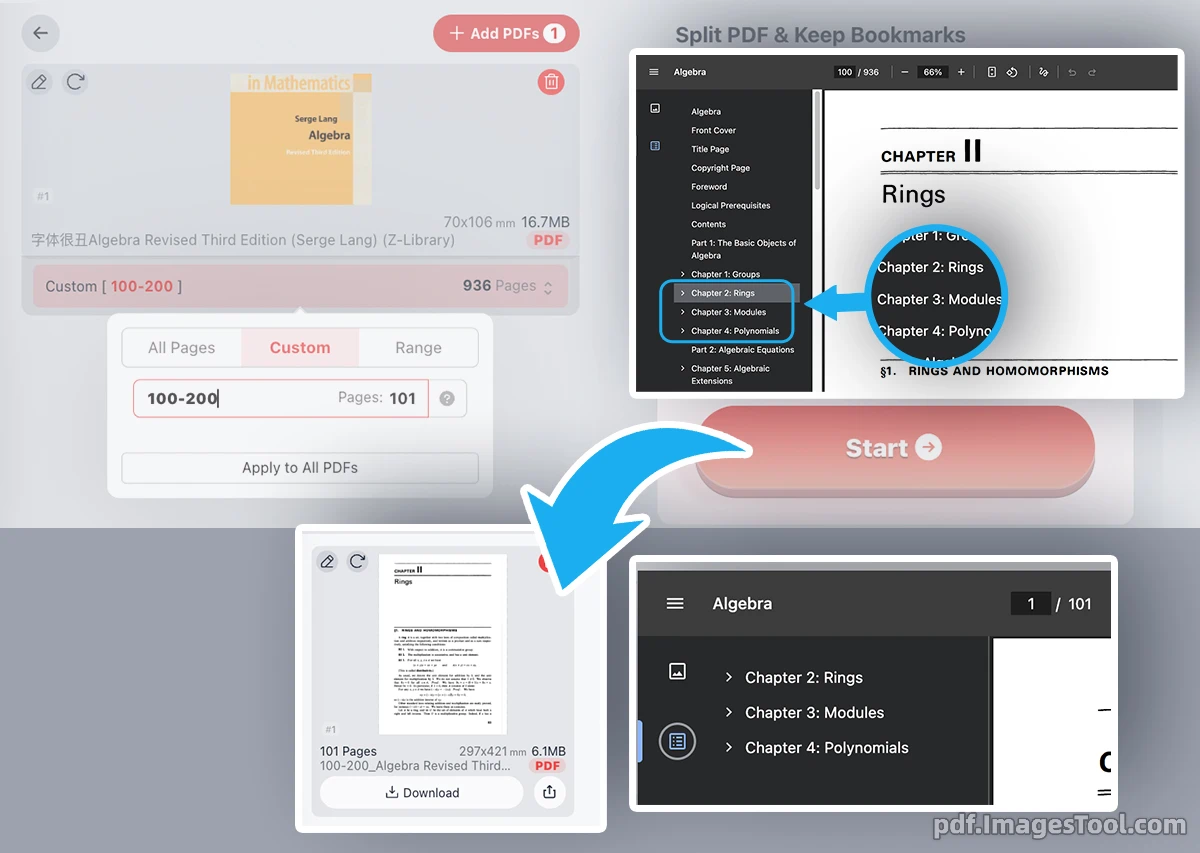
Splitting a large PDF document often means frustratingly losing its carefully structured outlines and navigation links. Not anymore. Our advanced PDF splitter allows you to effortlessly extract specific pages using highly flexible custom rules—whether you need simple ranges, odd/even pages, or complex exclusion patterns. The core magic of this tool is its ability to meticulously preserve the original bookmarks and outlines for the exact pages you extract. Just import your file, set your rules, hit start, and download a neatly packaged ZIP file containing your extracted PDFs with their navigation structure perfectly intact.
Your privacy and data security are our absolute priorities. Unlike traditional online PDF utilities that require you to upload sensitive documents to remote servers, our application is engineered with cutting-edge WebAssembly technology to run entirely within your local browser environment. There are absolutely no server uploads, no background tracking, no registration requirements, and no logins needed.
Core Features
- Smart Bookmark Retention: Accurately splits your PDF while flawlessly preserving the corresponding outlines and bookmarks for the extracted pages. No more manually rebuilding document navigation!
- Advanced Selection Syntax: Supports incredibly flexible page extraction rules. Choose simple pages (
5), ranges (1-5), up to the end (3-endor3-z), or even odd/even pages (even,odd). - Complex Exclusion Rules: Easily exclude unwanted pages from your selection using the ban rule (e.g.,
ban3or!3-5). Combine rules for maximum control, like1-10, ban4-6oreven, !end. - Reverse Indexing Support: Need pages from the back of the document? Effortlessly extract pages counting backwards using rules like
-3--1orr3-r1. - 100% Local Browser Processing: Military-grade privacy. All rendering and splitting operations happen on your local machine. Zero data ever leaves your computer.
- Instant Batch Export: Automatically processes your customized commands and packages all the individually split PDFs into a single, organized ZIP file for immediate download.
- Free & Account-less: Unrestricted access with no paywalls, no subscriptions, and zero login barriers. Just open the webpage and start working.
Frequently Asked Questions (QA)
A: No, absolutely not. Our tool uses pure browser-side technology. Your PDFs never leave your device, guaranteeing total privacy and eliminating any risk of data leaks.
A: Yes! This is our standout feature. If you decide to extract only pages 100 to 200, the tool will accurately carry over and retain only the bookmarks and outlines relevant to those specific pages.
A: You can combine our flexible extraction rules using a comma. For instance, typing
1-10, ban4-6 (or 1-10, !4-6) will extract pages 1 through 10, but automatically skip pages 4, 5, and 6. A: Yes, reverse indexing is fully supported. For example, entering
-3--1 or r3-r1 will extract the final three pages of your PDF document. A: Based on my testing (Mac M1), splitting a 100-page PDF with bookmarks takes approximately 15 seconds. Since all processing relies on your device's local memory and browser capabilities rather than our servers
A: No. The tool is 100% free, requires zero software installation, and asks for no registration or login. Simply open the web page and enjoy instant access to professional PDF splitting.