

Extract Every Nth Page from PDF
Automatically extract specific pages from long PDF documents at a fixed interval to create a new PDF. Whether you need to extract one page every 3 pages (gap-3) or every 5 pages (gap-5) for previews or audit sampling, this tool helps you finish the task quickly. Easily handle large batches of scans or long reports.
Try these now PDFs:
Does this online conversion service protect my privacy? Are the files I import safe?
Very safe, because your files never leave your device and are not uploaded. ImagesTool uses browser technology to achieve the conversion service that previously required uploading.
Everything happens only in your browser, 100% protecting your privacy.
You can do a test Convert once, then disconnect the device from the network, and convert again and you will find that everything is normal.
Split
Efficient PDF Extraction: How to Extract Every Nth Page in Seconds
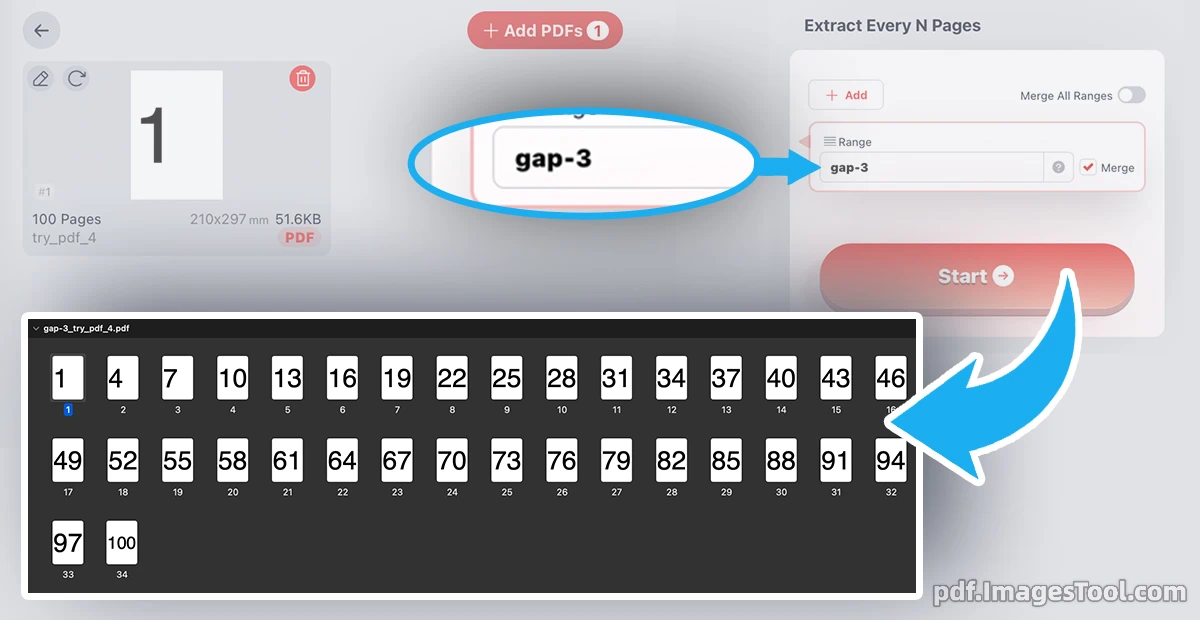
Managing massive documents often requires smart sampling rather than manual page-picking. Whether you are an auditor, a researcher, or a digital archiver, the ability to extract one page every N pages is a vital skill. This process allows you to take a long document and, using a fixed interval, pull specific pages to form a new, condensed PDF.
Our tool, developed by imagestool.com, allows for precision control. You can set a 'gap-3' logic to start from the first page (1, 4, 7...) or a 'gap3' logic to pull from the third page (3, 6, 9...).
Why You Need This Tool in Your Workflow
- Create Quick Previews: Turn a 500-page ebook into a 'lite' version so clients or readers can get the gist without seeing the full content.
- Audit & Sampling: For financial reports or large batches of invoices, pulling pages at regular intervals (e.g., every 5th or 10th page) is the standard for quality control.
- Clean Up Scanned Documents: If you have scans where every other page is a blank sheet or a separator, this tool removes the clutter instantly.
- Optimize Storage: Save only the necessary reference pages to reduce file size significantly.
- Lightning Fast: Process a 300-page PDF in under 1 second. The speed is unmatched for high-volume tasks.
- Privacy First: Your files never leave your computer. The tool runs entirely in your local browser, meaning no uploads, no servers, and zero risk to your data privacy.
- No Limits: Enjoy unlimited use without registration, logins, or hidden fees.