

Split Last Page or End Pages from PDF
Professional online tool to extract the last pages of a PDF. Support splitting the final page or specific end ranges (e.g., last three pages: [r3-r1]). You can also extract the last pages from multiple PDFs and merge them into one document. Processes locally in your browser for maximum privacy—no registration or upload required.
Try these now PDFs:
Does this online conversion service protect my privacy? Are the files I import safe?
Very safe, because your files never leave your device and are not uploaded. ImagesTool uses browser technology to achieve the conversion service that previously required uploading.
Everything happens only in your browser, 100% protecting your privacy.
You can do a test Convert once, then disconnect the device from the network, and convert again and you will find that everything is normal.
Split
Extract and Split PDF Last Pages Effortlessly with Local Privacy
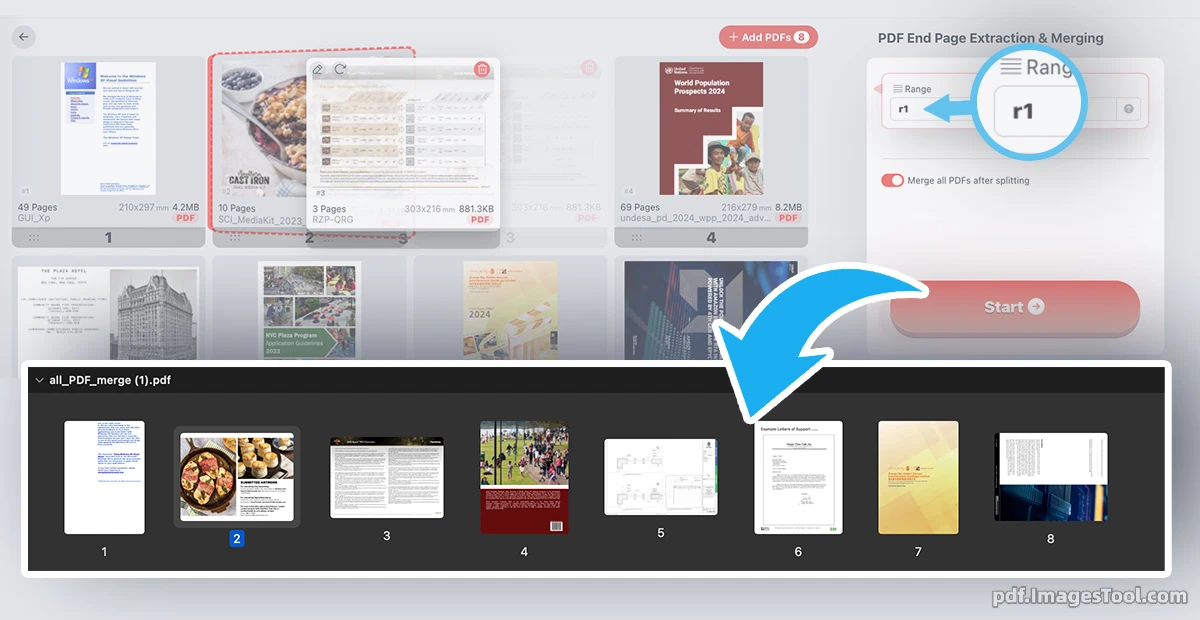
Managing long PDF documents is now simpler than ever when you only need the conclusion, signature pages, or the final few pages. Our PDF Last Page Extractor is a high-performance utility designed to instantly isolate the end of your documents. By using intuitive reverse-range commands—such as entering 'r5-r1' to grab the last five pages—you can precisely split and extract exactly what you need. Whether you are handling a single file or batch-merging the last pages of dozens of PDFs into one consolidated document, our tool delivers optimized, high-quality results in seconds.
Security and speed are the foundations of our platform. Unlike traditional online converters that require you to upload sensitive data to a remote server, this tool operates entirely within your browser. Leveraging advanced client-side technology, your files are processed locally on your machine, meaning your data never leaves your device. There is no registration required, no login prompts, and zero server-side storage. It is the ultimate 'plug-and-play' solution for professionals who demand 100% privacy and lightning-fast performance without the wait times of traditional uploads.
Core Features
- Advanced Reverse Range Splitting: Effortlessly extract specific end-sequences by entering commands like 'r1' for the last page or 'r10-r1' for the final ten pages.
- Batch Tail-End Merging: Select multiple PDF files and automatically combine their last pages into a single, professionally formatted PDF or a organized ZIP archive.
- Intelligent File Optimization: Every processed document undergoes automatic file size optimization, ensuring your output is lightweight and ready for email or web sharing.
- 100% Local Browser Processing: Experience total privacy with a 'No-Cloud' approach. Your documents stay on your computer, eliminating the risks associated with data breaches.
- Instant Start, No Account Needed: Skip the friction of sign-ups. Our tool is ready to use the moment you open the page, providing a seamless workflow for busy users.
Frequently Asked Questions (QA)
A: It’s simple! To get the very last page, use 'r1'. To extract the last 5 pages, type 'r5-r1'. This 'reverse' logic allows you to target the end of any document regardless of its total page count.
A: Absolutely. Our tool uses pure browser-side processing. Your files are never uploaded to any server, ensuring that your sensitive information remains completely private and under your control.
A: Yes. You can drag and drop multiple files into the interface. The tool can either provide a ZIP file containing the last pages of each document or merge all those last pages into one single PDF file.
A: No. While we optimize the file size to make it more efficient for sharing, we maintain the professional visual quality of the text and images within your PDF.
A: Since the processing power comes from your own computer, there are no artificial limits imposed by us. You can process as many documents as your browser can handle.