

Visual Online PDF Splitter
Accurately extract the PDF pages you need by clicking thumbnails or entering a custom page range. Enjoy real-time previews, blazing-fast local browser processing, and complete privacy. 100% free with no registration or login required.
Try these now PDFs:
Does this online conversion service protect my privacy? Are the files I import safe?
Very safe, because your files never leave your device and are not uploaded. ImagesTool uses browser technology to achieve the conversion service that previously required uploading.
Everything happens only in your browser, 100% protecting your privacy.
You can do a test Convert once, then disconnect the device from the network, and convert again and you will find that everything is normal.
Split
Visually Split PDF Pages Online
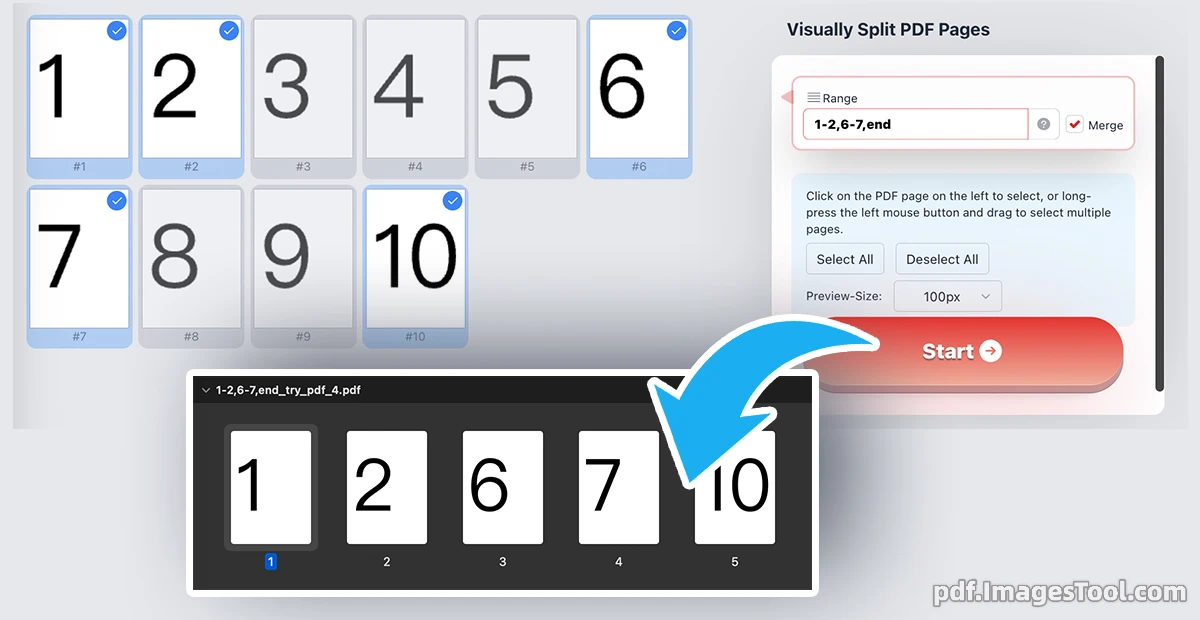
Effortlessly extract and divide your PDF documents with our highly intuitive visual interface. Whether you need to isolate a few specific pages or break a large document into manageable pieces, our tool allows you to precisely select pages by clicking on real-time thumbnails or inputting custom page ranges. You have complete flexibility: choose to split your selections into individual, separate PDF files, or seamlessly merge the extracted pages into one brand-new document.
100% Privacy Guaranteed & Local Processing. Your files never leave your device. All PDF splitting and rendering are executed entirely locally within your web browser. There are no server uploads, no cloud processing, and zero risk of data leaks. No registration, no login, and no software installation required—just instant, secure processing.
Follow these simple steps to split your PDF efficiently:
- Click the "Import PDF" button or simply drag and drop your PDF file into the designated area.
- Visually select the pages you want to keep by clicking the thumbnails, dragging to multi-select, or typing a specific range (e.g., "1-2,6-7,end") in the input box.
- Click the "Start" button to process your document instantly.
- Download the generated ZIP archive, which contains all your newly split or merged PDF files.
Page Extraction Rules
Empty string - Extract all pages of the document.
5 - Extract only page 5.
1-5 - Extract pages 1 to 5.
3-end or 3-z - Extract from page 3 to the last page.
-3--1 or r3-r1 - Extract from the 3rd to last page to the last page.
even / odd - Extract all even / odd pages (can include a range, e.g., 1-10:even).
ban3 or !3-5 - Exclude page 3, or exclude pages 3 to 5.
1-10, ban4-6 - Combine rules (comma-separated): Extract pages 1 to 10, but exclude pages 4 to 6.
even, !end - Exclude-only or combine with even/odd: Extract all even pages, but exclude the last page.
Core Features
- Interactive Visual Selection: Simply click on the PDF page thumbnails on the left panel to select them. You can also long-press the left mouse button and drag to effortlessly highlight and select multiple pages in a single motion.
- Flexible Custom Page Ranges: Skip the clicking and type exactly what you need. Support for custom range inputs allows you to use formats like "1-2, 6-7, end" or "3-end" to instantly target the exact pages for extraction.
- Split or Merge Options: Total control over your final output. Extract your selected pages as multiple standalone PDF files, or check the "Merge" box to stitch all chosen pages together into one unified PDF document.
- Adjustable Preview Thumbnails: Customize your workspace for the best viewing experience. Change the PDF page preview sizes from the dropdown menu, with 50px, 100px, 150px, and 200px options available to suit your screen size.
- One-Click Bulk Management: Instantly manage massive documents using the "Select All" and "Deselect All" buttons, streamlining your workflow and saving you valuable time.
- Lightning-Fast Local Engine: Powered by cutting-edge browser technologies, the rendering and splitting happen immediately on your machine without relying on slow internet connections or cloud queues.
Frequently Asked Questions (QA)
Q: Is it safe to process confidential or sensitive PDF documents here?
A: Yes, absolutely. You are not "uploading" your files to any external server. Our tool is designed with a privacy-first architecture, processing your PDFs entirely locally inside your browser. Your data remains strictly on your computer, ensuring enterprise-grade security and peace of mind.
Q: What does it mean when I type "3-end" in the range input box?
A: The range input box supports advanced shorthand. Typing "3-end" tells the tool to automatically select every page starting from the 3rd page all the way to the very last page of your uploaded document. You can also mix specific pages and ranges, such as "1, 4-6, 9".
Q: Will the tool generate multiple single-page PDFs or one combined file?
A: It depends on your preference. By default, the tool will split your selected pages into separate, individual PDF files packaged in a ZIP archive. However, if you tick the "Merge" checkbox in the control panel, it will combine all your selected pages into one continuous PDF file.
Q: Do I need to create an account or download an app to use this tool?
A: No. Our Visual PDF Splitter is completely free, requires absolutely no registration or login, and works directly in your web browser. There is no software to download or install.
Q: How do I select a large chunk of pages quickly without typing?
A: You can long-press your left mouse button on the first page thumbnail you want, and then drag your cursor across the other thumbnails. The tool will smoothly select multiple consecutive pages for you in real-time.